Pipeline rules
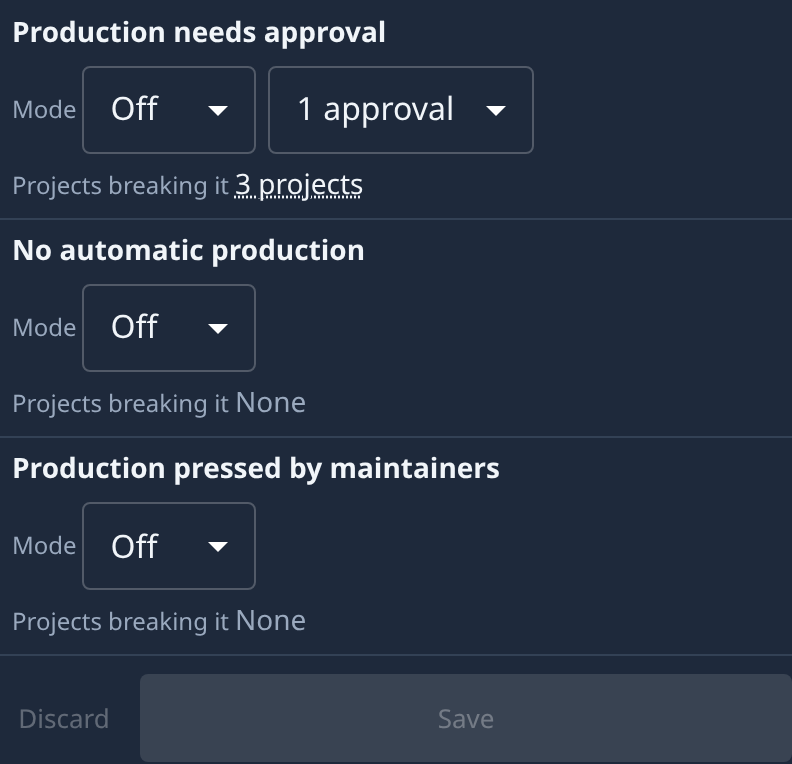
Pipeline rules are your organization's checks on the step into production, the same for every project. Jaah checks them each time someone saves a project's pipeline. The section sits in Settings, under Customize › Pipelines; open it from the sidebar.
Who sees it: Org Owners and Org Admins. Other members don't see the section, but every pipeline save they make is still checked.

The table
Each rule is one row. Point at a rule's name for what it asks; More beside the hint explains each mode and links the how-to.
| Column | What it shows |
|---|---|
| Rule | The rule's name. |
| Mode | Off, Warn or Block. Production needs approval also has the number of approvals it asks for, from 1 approval to 5 approvals. |
| Projects breaking it | How many projects you can see that have a repository and whose saved pipeline breaks the rule today, as if the rule were on, such as 3 projects. Point at the count, or tap it, for their names. None means every saved pipeline meets it. |
Below the table, Save stores your changes and Discard drops the ones you have not saved. Both stay greyed out until you change something.
The rules
Each rule looks at the step into production: the step into the last stage that has a branch name, when a pipeline has at least two such stages. A pipeline without one passes every rule.
| Rule | What it asks of the step into production | Hint on hover |
|---|---|---|
| Production needs approval | At least the number of approvals picked beside its mode (1 unless changed). Whoever asked for a release can never approve it. | The step into production needs approvals. |
| No automatic production | The step's Runs is By hand, never By itself. Runs is on the step's panel; the steps table shows it in the How it runs column. | The step into production never runs by itself. |
| Production pressed by maintainers | Only Org Owners, Org Admins, Maintainers and named people may press it: neither Developer nor Viewer may be ticked under Can press. A step left on its default passes. | Only maintainers and above may press the step into production. |
The modes
| Mode | What a pipeline save does when the step breaks the rule |
|---|---|
| Off | Not checked. Every rule starts Off. |
| Warn | Saves. The card of the stage the step enters shows the warning, and Saved with 1 warning shows under the pipeline's Save. |
| Block | Refuses the save until the step complies. The stage's card names the rule and the fix. A block holds for everyone, Org Owners included. |
Saving a rule changes no project's pipeline: each project meets it on its next save.
On a phone, each rule is a card: its name, then Mode, then Projects breaking it.
Related
- Turn a rule on and roll it out: Set your org's pipeline rules.
- Fix a project a rule flags: Fix a pipeline an org rule blocks.
- Every stage and step setting: Set up a project's pipeline.
- The rest of the Projects category: Settings.