API keys
An API key lets a script, a CI job or another service call the Jaah API as its owner, without signing in to the console. A key never does more than its owner can: it acts with the owner's own access, narrowed to the permissions ticked for it. To call the API with a key, see Authentication; to hand a key to agents, see Give agents a Jaah API key.
API keys is a section of Settings › Personal › Security, which every member can open. No plan gates it. Every member can make keys and sees their own. Every Org Owner and Org Admin sees every key of the organization, never its secret, and can revoke any of them. Only a key's owner can change it or rotate its secret. Jaah support may hold a key in your organization while working on your behalf; its owner reads Jaah, and you can revoke it.
The list
New key sits above the list; with no key yet, the page reads No API keys yet with the same button.

Each key is a row, read left to right:
| Field | Meaning |
|---|---|
| Status mark | Active, Expiring soon (7 days or less left), Expired, Revoked, or Owner suspended (the owner's account is disabled, so the key is refused until they are back; a line under the name says so). Hover it for the word. |
| Visible characters | The secret's first and last characters (jaah_…Ab3d), never the secret itself. |
| Name | The key's name. An ended key's row is dimmed. |
| Last used | How long ago the key last made a call, and from which address, or Never used. |
| Permissions | All permissions, Read-only, No permissions, or how many are ticked, for example 43 of 44 permissions. |
| Owner | Who the key acts as (Jaah for a key made on your behalf). |
| Expires | Never, Expires in a number of days (hours or minutes on its last day), or Expired; a revoked key reads Revoked, a suspended owner's key Owner suspended. |
A row opens the key's page. Its ⋯ menu holds Open and, when you may revoke the key, Revoke.
A new key
New API key has two tabs, Overview and Permissions, and a bar with Cancel and Create. Create stays off until the key has a name and a valid expiry.
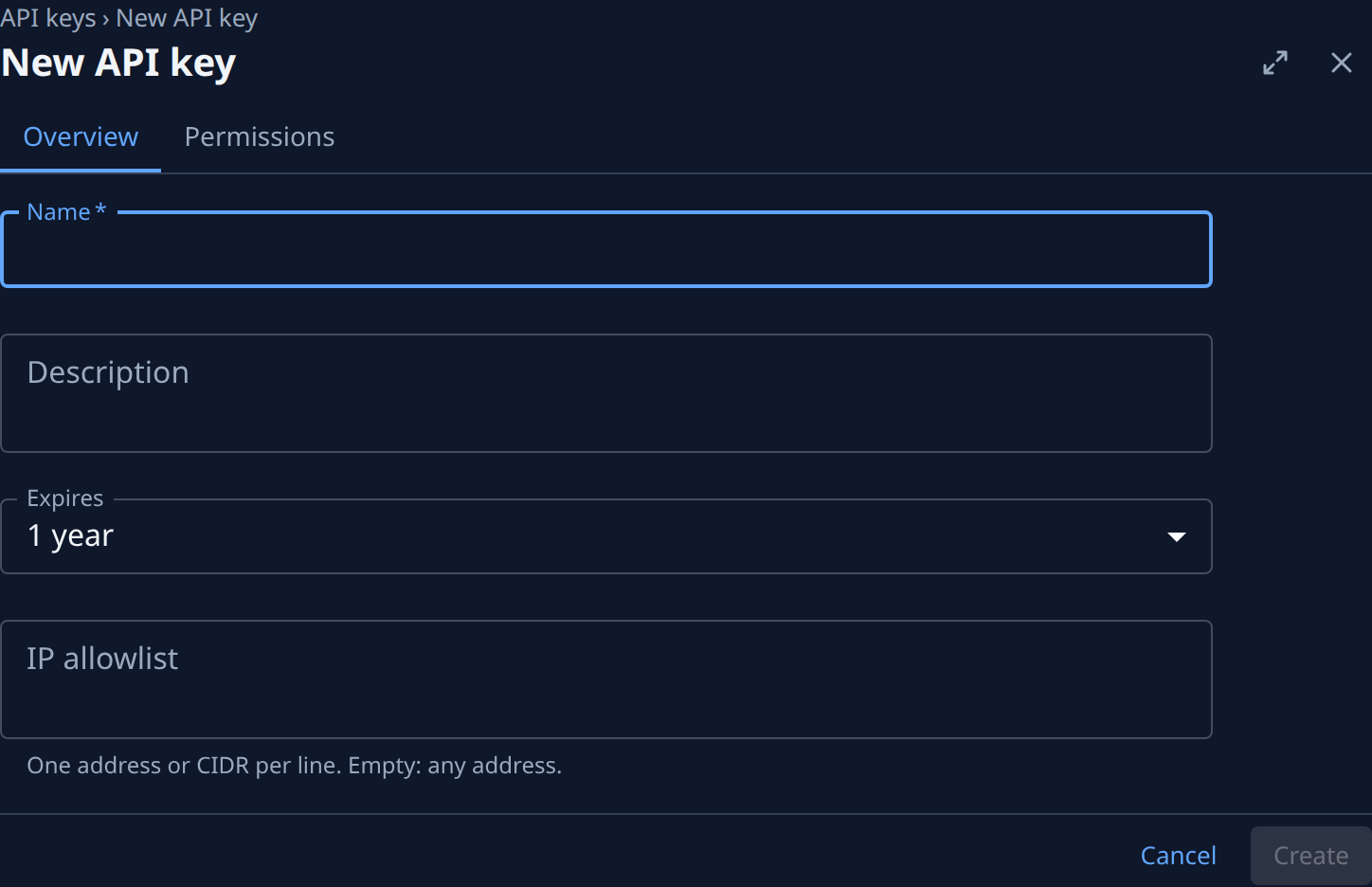
| Field | What it means |
|---|---|
| Name | Required, up to 100 characters. Identifies the key in lists; calls never send it. |
| Description | Optional, up to 1,000 characters. An admins' note; it never changes what the key can do. |
| Expires | 7 days, 30 days, 90 days, 1 year (the default), Custom date or No expiration. Calls are refused after it, and it can't be extended later. |
| Expiry date | Shown for Custom date: the moment calls start being refused. A time in the past reads "Pick a time in the future." |
| IP allowlist | One address or CIDR range per line (203.0.113.7, 10.0.0.0/16). Empty: any address. Calls from any other address are refused; your organization's own IP allowlist applies too. |
After Create, the key's secret is shown once in a dialog titled "name: your secret": "Copy it now. You won't see this secret again." Its Done closes it onto the key's own page. From then on the list and the key's page show only the visible characters; a lost secret means rotating the key.
Permissions
The Permissions tab is a grid: a row for each part of Jaah, and a box for each of View, Create, Edit and Delete that the part offers. Hover a column heading for what its box lets the key do. A new key starts with every box ticked; an existing key shows its own. Under the grid: "A key never does more than its owner can."
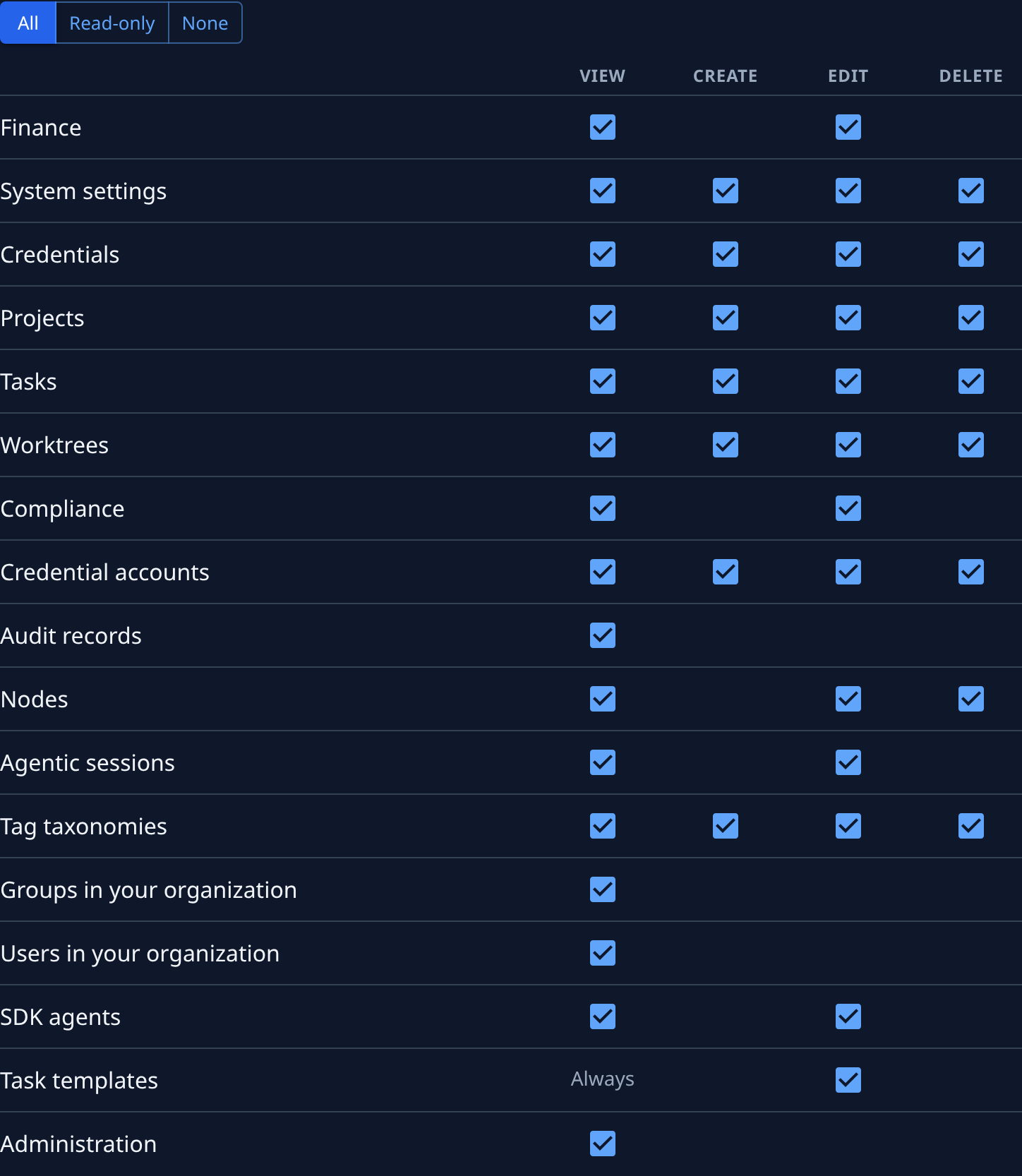
| Control | What it does |
|---|---|
| All | Ticks every box. A key with every box ticked also gets what Jaah adds later. |
| Read-only | Ticks only the View column. |
| None | Clears the grid. |
| Always | In the View column of a part every member may view, such as Task templates: every key can view it. |
| Administration | Lets the key act with its owner's admin rank: people, groups, access, settings. Shown to Org Owners and Org Admins only. |
The highlighted preset is the one the grid matches. On a phone each part is a card of its own with its labelled boxes. A key can never manage API keys, change account security, or open a live stream; those need the console.
A key's page
The header shows the key's name, its status and its visible characters, with Rotate (its owner only) and Revoke. Three tabs: Overview, Permissions and Activity, and a bar with Cancel and Save. Overview keeps Name, Description and IP allowlist editable for the owner, and shows these facts between them:
| Field | What it shows |
|---|---|
| Owner | Who the key acts as. |
| Expires | The date and how long is left, or Never. |
| Created | When, and by whom. |
| Last used | When and from which address, or Never used. |
| Old secret | After a rotation, until when the previous secret still works. |
| Revoked | When, and by whom; only on a revoked key. |
A saved change applies from the key's next call; the secret stays the same, and the expiry can't be changed. Another person's key reads "owner's key. Only its owner can change or rotate it."; a revoked or expired key reads "This key has ended. Create a new one."
Activity lists the key's events, newest first: created, edited, rotated, revoked, each refused call, and every request made with it, each with who and how long ago. A row opens the event in Audit. There, a request made with a key shows Key and the key's name before its owner in the list, and its details' Actor reads "owner via API key name". No secret is ever recorded. With nothing yet it reads Nothing yet.
Rotate and Revoke
Rotate opens "Rotate name?": "A new secret replaces the current one. Settings and expiry stay the same." Its one choice, Old secret keeps working for, is None (the old secret stops at once), 1 hour, 24 hours (the default) or 7 days; calls with the old secret still succeed until then. Its Rotate shows the new secret once, as at create.
Revoke, on the key's page or in a row's ⋯ menu, asks "Revoke name?": every call with the key is refused from then on, and it can't be undone. The key stays in the list as Revoked.