Contribute a catalog connector
A connector is an agent built with the Jaah Agent SDK and shared with every organization through the
Catalog tab, under Settings, Customize, Agents. Connectors are proposed and reviewed in the
agent-connectors repository, on its main branch. Its
contributing guide and governance rules are the procedure — how to build a connector, the checks it must
pass, and how it's reviewed and approved — so follow them rather than any summary. The repository is public:
anyone may propose a connector.
What the Catalog tab shows
The Catalog tab, under Settings, Customize, Agents, lists every agent your organization can use, on every plan. It has up to four sections, each headed by its name and how many agents it holds: Built-in (the agents Jaah runs itself), Your agents (the ones your organization registered on the Custom agents tab), Catalog (the shared connectors) and Registry (the agents your organization installed from the ACP registry). An empty section is left out, except Catalog, which then reads No connectors yet with Contribute one.
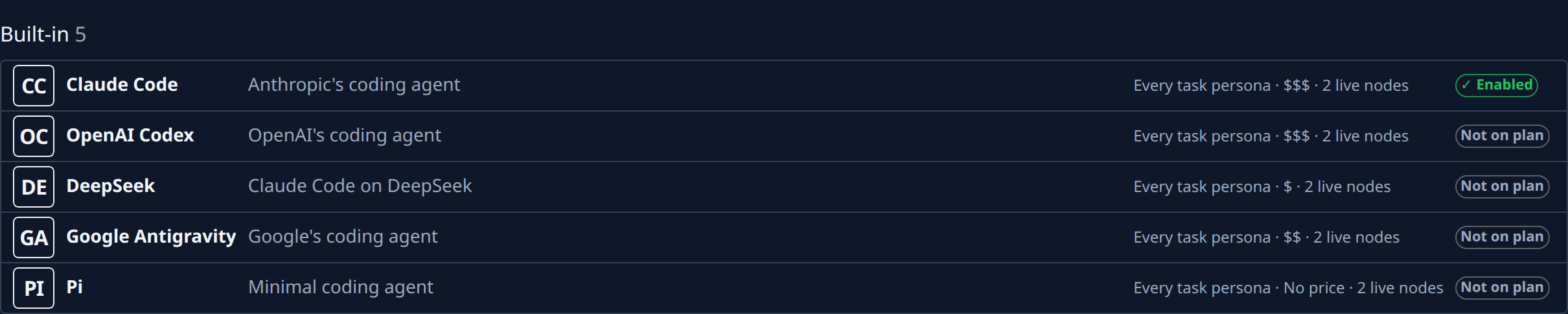
Each row is one agent: its logo, its name, its description when it has one, a line of facts, and a mark — Enabled, Off, Not on plan for a built-in agent your plan leaves out, Unsupported for an SDK v1 agent (hover it for why; it can't be turned on), or Removed from catalog. On a narrow screen the description goes under the name and the facts line under both.
The facts line is short, with the full version on hover:
- Personas — the kinds of task it takes, or No personas. A built-in agent reads Every task persona; hover for the list.
- Cost — $, $$ or $$$ for a built-in agent whose model Jaah has a price for. On hover the band gives way to its price range, such as $0.50–$50 per million output tokens. No price otherwise, and always for the others, whose model is their own.
- Nodes — how many of your live nodes can run it, such as 2 live nodes, or No live node. On hover it also says, for a built-in agent, whether its model accounts can take work: accounts ready, API-key spillover only, every account at its quota or no account.
Hovering the line adds two more facts:
- Ledger — how its finished tasks turned out: No ledger data yet, Insufficient data with the number of outcomes so far, or its figures (such as survival) with their range and the number of outcomes.
- Router — whether Jaah may pick this agent for a task by itself, in one sentence.
Every figure in a row is Jaah's own, never reported by the agent's publisher.
Propose a connector
-
Build the connector as an ordinary SDK agent: follow Build an agent with the SDK and the Agent SDK reference.
-
Open Settings, then Agents under Customize, then the Catalog tab.
-
While the Catalog section is empty, press Contribute one to open the agent-connectors repository; once it lists connectors, open the repository from the link above. Propose against its
mainbranch.
-
Follow the repository's contributing guide to propose your connector, and its governance rules for how the review runs.
-
Once the connector is approved, Jaah publishes it, and it shows as a row in the Catalog section of the Catalog tab.
Turn on a connector for your organization
Turning a connector on or off applies to your whole organization, so it needs the org admin role. Someone who may edit agents but is not an org admin sees Only admins can enable catalog agents. above the list instead of the buttons.
- Open Settings, then Agents under Customize, then the Catalog tab.
- On the connector's row in the Catalog section, select Enable. The row shows Enabled. When SDK agents are off for your organization, Enable is greyed out; hover it for why.
- The connector now appears in a task's Agent field, and in a project's Default agent, under Your agents & catalog. It runs like any agent you registered yourself (see How agents work).
- To turn it off again, select Disable on its row.
When a connector is removed from the catalog, organizations that turned it on see its row marked Removed from catalog. Tasks that use it fail to start until you pick another agent in their Agent field.