Get an agent your plan leaves out
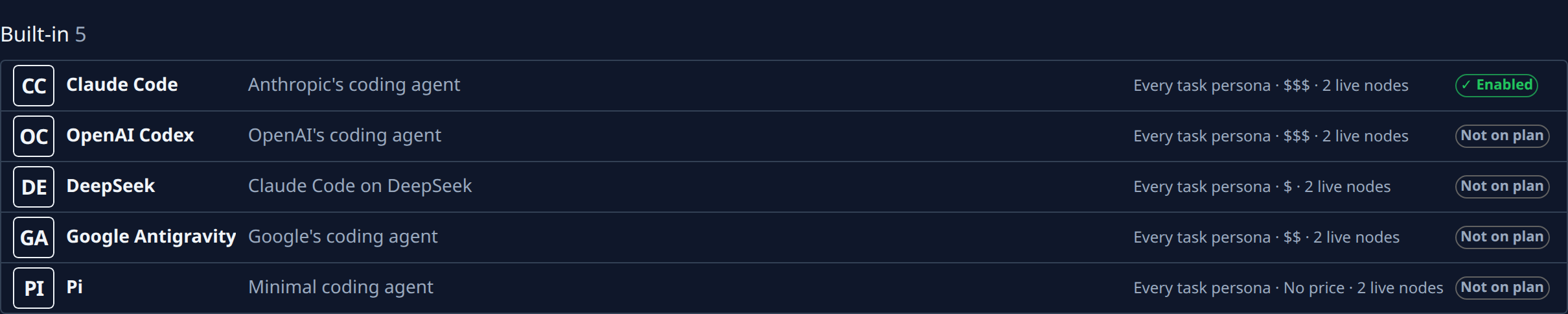
Your plan lists the agents your organization may run. A built-in agent it leaves out shows on the Catalog tab marked Not on plan, and has no button to turn it on. ACP registry agents work the same way: with none on your plan there is no Registry tab at all. Only a plan change brings either in. What each kind of agent is: How agents work.
Who can do this: anyone who can see agents can check and compare. Changing the plan needs the Org Owner or Org Admin role; everyone else asks one of them.
-
In the sidebar, select Settings, then Agents under Customize, then the Catalog tab.
-
In the Built-in section, find the agent. Not on plan at the end of its row means your plan leaves it out; what each mark means is in Agents.
-
Before you ask, check that a live node and an account could run it, as in Check which agents can take work.
-
For an ACP registry agent, look for the Registry tab; with none on your plan it is missing. See Install an agent from the ACP registry.
-
Get the plan changed:
- As an Org Owner or Admin, select See plans, or Settings in the sidebar, then Billing, and pick a plan that includes the agent, as in Change your plan. When the Subscription page offers Contact us instead of Change, follow Ask to change your plan and name the agent in the request.
- Anyone else: ask an Org Owner or Admin, naming the agent and what you saw in step 3.
-
Once the plan changes, go back to the Catalog tab. The built-in agent's mark now reads Enabled. A registry agent your plan now includes shows under a new Registry tab, where an org admin installs it as in Install an agent from the ACP registry.
-
Pick the agent in a task's Agent field, or make it a project's default. See Start a task and Set a project's default agent.
If your plan later drops the agent, it is no longer offered. Pick another agent for the tasks and projects that use it.
Related
- Agents: every tab, column and mark of the Agents area.
- Check your plan and limits: what your plan includes now.