How agents work
An agent is a program that does a task's work, governed through Jaah. Jaah's own runners are agents too; the Jaah Agent SDK lets you bring your own — a command-line coding tool you wrap, your own model loop, or a bot that writes a report and never touches code. Your code does the work. Jaah handles the rest the same way for every agent: the session log, questions to people, credentials, usage metrics and how the task ends.
Your plan lists the agents your organization may run, beside its providers: SDK agent covers the agents you register and the catalog's connectors, and each ACP registry agent is listed on its own. Agents open from Settings, then Agents under Customize. The model accounts your runners sign in as are under Directory, AI Accounts, whatever the plan. With SDK agents on, the Custom agents tab lists the agents your organization has registered. The Catalog tab, on every plan, lists every agent your organization can use — built-in, your own, the shared connectors you can turn on and your registry installs — with the personas each takes, how many live nodes can run it and how its finished tasks turned out (see Contribute a catalog connector). With at least one registry agent on your plan, a Registry tab lists the ones your organization can install (see Install an agent from the ACP registry). An agent whose plan entry is off is not offered, and a task already set to it fails with the reason. Seeing agents needs the permission to view them, and registering or changing one needs the permission to edit them — held by the same roles that may edit tasks (see How team and access work).
The Custom agents tab

Each row is one registered agent: its name, with a status mark — Active, Disabled, Last refresh failed (Jaah keeps running the last commit it pinned), Never fetched, Unsupported, or Removed from catalog for a connector taken out of the catalog. An agent built on SDK v1 is marked Unsupported and its name reads Unsupported and Re-register on SDK v2: it cannot be picked or run until you do that (hover Unsupported for why). The rest of the row's detail shows when you hover the name or the status mark; on a phone, tap the mark:
- Its facts: the kind of work it does (Coding, Non-coding or CLI wrapper), its language (such as Python or TypeScript), its version, the pinned commit, and catalog for a connector your organization turned on.
- Where it comes from: the repository, then the sub-path, then @ and the ref.
- The description from its manifest, and the reason when the last refresh failed. An agent built on SDK v1 reads Built on SDK v1 instead.
Select an agent's name to open its page beside the list. ⋯ offers Refresh, Disable or Enable, and Delete. A connector's row has no menu: it is turned on and off on the Catalog tab. Delete asks first; when a project's default agent or a task still uses the agent, it lists them and offers Disable instead.
An agent installed from the Registry tab reads a little differently. Its facts name how it is distributed (Binary, npm or Python) and end with ACP registry · pinned v and its version in place of a commit; its source is the repository alone, with no ref; and its detail names its key account: Key: and the account's name, Key account set when the account isn't one you can see, or No key account. Its ⋯ menu starts with Open key account when one is bound, then offers Disable or Enable, and Delete; its page holds the Key account field (org admins only) — there is no ref to edit and nothing to refresh (see Install an agent from the ACP registry).
Add agent sits beside the list; with no agents yet, the No agents yet note holds it instead. It opens a new agent's page; an agent's own page has the same fields with the repository locked, and More for Refresh, Disable or Enable, and Delete.
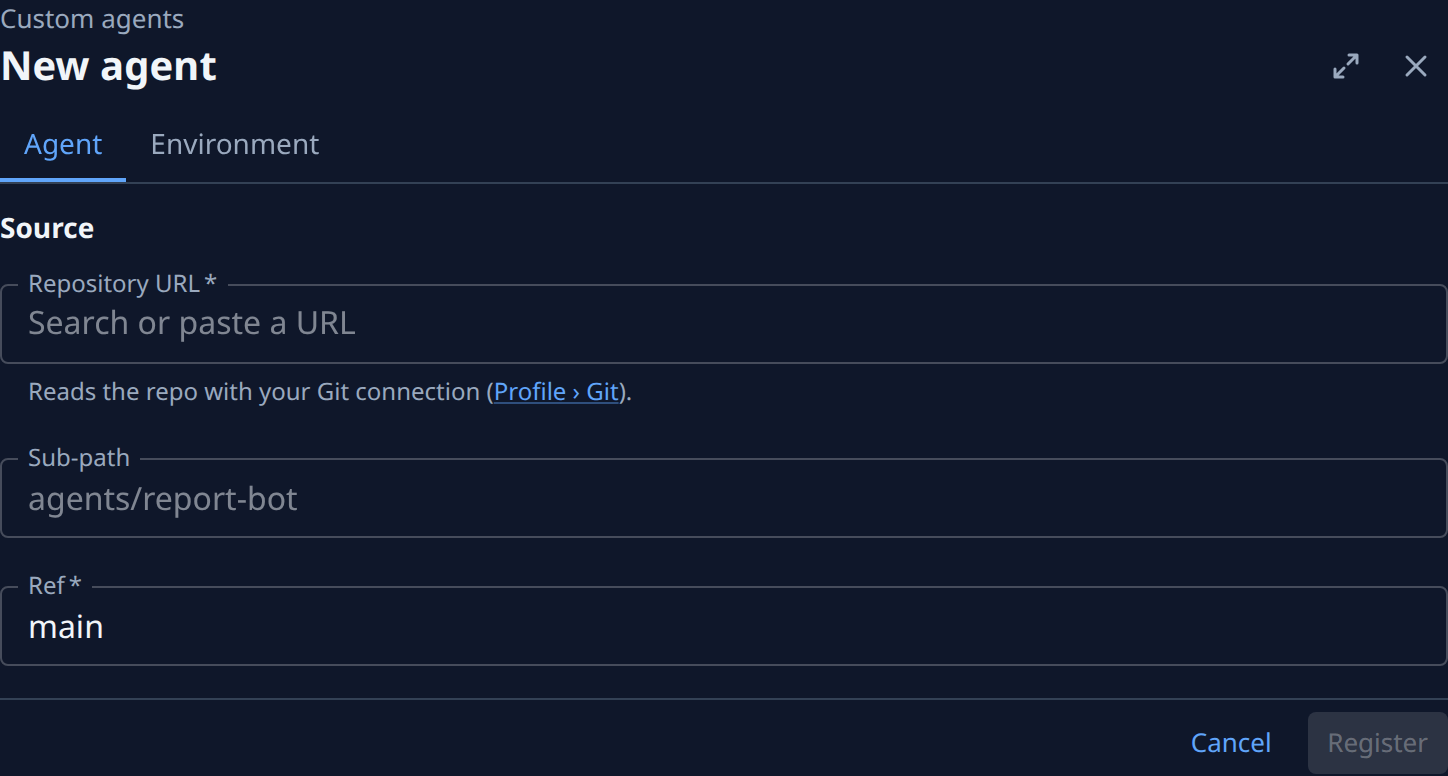
- Repository URL: the GitHub repository. The field suggests repositories from your own Git connection (Settings › Personal › Git) and warns when the address is not among them.
- Sub-path: the folder that holds the manifest, when it is not the repository root.
- Ref: a branch, tag or commit; main by default.
- Environment (its own tab): names and values set on the agent's process when it runs, such as the model a connector should use. Add variable adds a row. Never put a secret here — use a secret.
Register (or Save) fetches the repository and checks its manifest, which takes a few seconds. Each problem it finds is listed on the page.
From a repository to a running task
- An agent is a GitHub repository with a manifest named
jaah-agent.tomland the files itscommandruns — the SDK included, and a list of the packages it depends on. The manifest names the agent, its language, the command, and which kinds of task (personas) it may run. Every field is in the Agent SDK reference. - You register it on the Custom agents tab with Add agent: the repository URL, an optional sub-path when the agent is not at the repository root, and a ref. Jaah reads the repository through your own GitHub connection, checks the manifest — and that the folder carries the SDK its command imports and lists its dependencies — and pins the commit the ref pointed at. A branch or tag is pinned again to its newest commit within about 15 minutes of a push; Refresh does it at once. Enter a commit as the ref to keep the agent on that exact code. Disable keeps it registered but stops new tasks from using it.
- You pick it. A task's Agent field, or a project's Default agent in the project's settings, chooses which agent runs the work. A task's own pick wins; a project's default agent covers only the personas its manifest names, and other tasks run as before.
- A node runs it. When the task starts, a node unpacks the pinned
commit, installs the packages the folder lists into it, and runs
commandfrom the agent root as an ACP agent under the node's ACP host. The node provides no SDK. The task is the agent's first prompt; the session works in the task's worktree. - It ends the task. The agent makes one final call: settle when the work is done (with a merged pull request, or with no pull request and the evidence why), or fail when nothing a person could do would let it finish. If a turn ends with the task still open, the node prompts the agent once to finish and settle.
If the task's agent cannot run at all — it was disabled or removed, it does not serve the task's persona,
it is an SDK v1 agent, or it was never fetched — the task fails to start with [agent_unrunnable] and the
reason, rather than quietly falling back to a built-in runner.
What Jaah records
The agent speaks ACP to the node, and Jaah's extension to ACP for the rest, so this is the same whatever your agent is built on.
- Session. Each run is a session, listed under Audit, Sessions. Its transcript holds what the agent sends: messages, thoughts, tool calls, plans and usage.
- Questions. When the agent needs a person, it asks one question, with options or free-form, and ends its turn. The task waits for an answer exactly as it does for a built-in runner, in the console and in Slack (see Answer a question); the answer is the agent's next prompt. Under Full Auto the agent decides for itself and may ask only about something only a person can provide: a credential, an access, a physical act or a change in an outside system.
- Usage and metrics. The agent reports the tokens each model call used. Jaah prices them on the session's Efficiency view. Your agent pays for its own model: Jaah's model accounts are not used for SDK agents.
- Credentials. The agent can list the credentials its task may use and fetch one
(see How secrets work). A secret reaches a tool as a file
it reads — the SDK writes one, mode
0600— never an environment variable or an argument. Never log a secret or write one into a message, an artifact, a question or a settle. - Documents. The agent can upload a report and other deliverables, which show on the task's Artifacts tab, and read or search other tasks in the project.
The security gate
No automated reviewer stands between an SDK agent and a merge: every SDK agent's security gate is human. When a change touches sign-in or access control, credentials or secrets, data migrations, or personal data, the agent must never merge it and never turn on automatic merging. Instead:
- When the task is not Full Auto, the agent asks one question with the header Security and the options approve and do-not-merge, and merges only on approve. Otherwise it settles and leaves the pull request open.
- When the task is Full Auto, the agent opens the pull request as a draft and fails the task with a reason that names the security surface first and carries the pull request's address, so a person reviews it.
Rules every agent follows
- Speak ACP on standard input and output. Anything printed for people goes to standard error.
- Don't daemonize. Jaah knows which task a call belongs to from the processes it started: your
program must stay a child, or grandchild, of the process
commandstarts. A process that double-forks, callssetsidto escape, or is handed tonohupor systemd is cut off from its task. Child processes you start and wait for are fine. - Carry the SDK; list its dependencies. The node provides no SDK, and installs only the packages
your folder lists. A Python agent carries
jaah_agentandrequirements.txtbeside its script; a TypeScript agent is bundled into one file together with the SDK, beside apackage.jsonandpackage-lock.json(see Add the SDK). A folder whose script imports the SDK without them is refused when the agent registers. Commit no third-party code.
To build your first agent, follow Build an agent with the SDK.