Project variable
A project variable is one line written into a slot's settings file when a task claims the slot. Each variable has its own page, which opens beside the project's Settings › Variables. Select Add variable there for a new one, or a variable's name to open it. The same page serves both: a new variable's page is titled New variable.
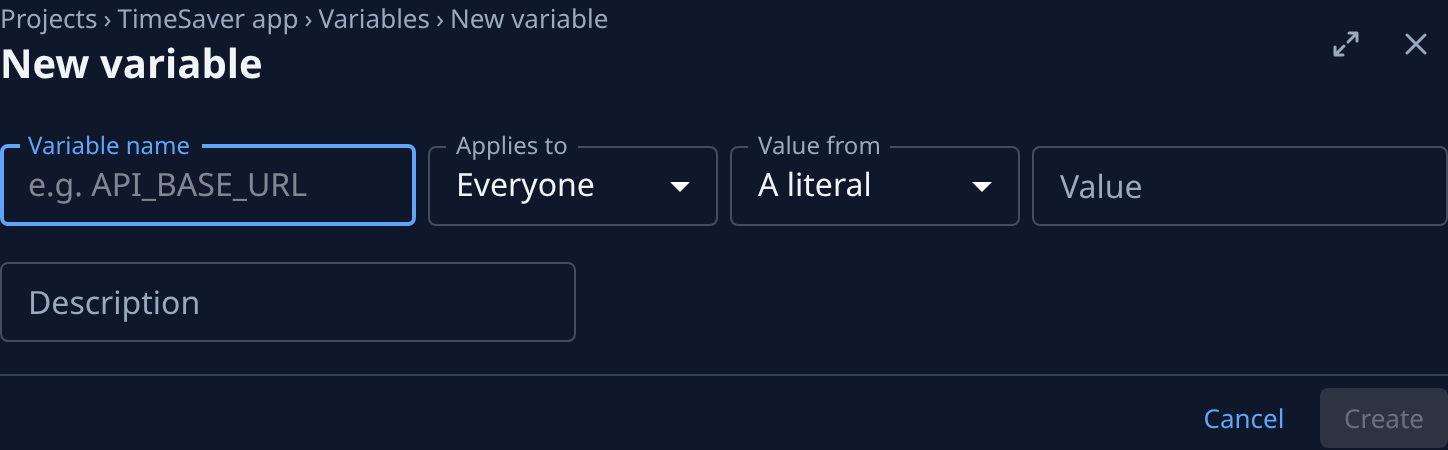
The screens below show a new variable, taken with the Org Admin role.
The header
| Item | Meaning |
|---|---|
| Trail | Projects, the project's name, Variables and the variable's name. Select a part to go back to it. |
| Title | The variable's name, or New variable. |
| Scope chip | Project default for a variable that applies to everyone, Your override for your own Only me value, Another user’s override for another member's. Not shown on a new variable. |
| Not resolved | The variable gets no value, so it is left out of the slot's settings file. Point at it to read why. |
| ⋯ | The page's menu, with Delete. Shown only on a saved variable you can change. |
| Maximize and close | Widen the page over the list, or close it and go back to the list. |
Status lines
Above the fields, a saved variable can show one or two lines:
- ⚠ Not resolved — and why: the credential it read was deleted, the person it resolves under has no access to that credential, the chosen field isn't set on the credential, or the credential is sealed with NodeVault and only your nodes can open it. Each ends with It is left out of the slot’s .env entirely.
- ⚑ and what on the node writes this name instead. The variable is still written; this is only a warning.
The fields


The fields, in screen order. The ones after Value from depend on what it is set to.
| Field | Meaning |
|---|---|
| Variable name | The name written to the slot's settings file, for example API_BASE_URL. |
| Applies to | Everyone: written into every member's slots for this project. Only me: written into your slots only, and used there in place of the Everyone value. Shown only if you can edit the project; otherwise every variable you add applies only to you. Can't be changed once saved. |
| Value from | A literal, a value you type here; A credential, read from a credential field when a slot is claimed; or Port, a free port the node picks for each slot. Port is offered for Everyone only. |
| Value | With A literal: the value. It is stored and shown as plain text that anyone with access to the project can read, so keep secrets in a credential. |
| Credential | With A credential: the credential to read. Only credentials you may use are listed. Picking another one clears Credential field. |
| Credential field | With A credential: which of the credential's fields gives the value. A secret field is marked (secret); its value never shows on this page. Reads Choose a credential first. until a credential is picked. |
| Port | With Port: Auto-assigned per slot, or Preferred port. Two slots never share a port. |
| Preferred port | With Preferred port: a port from 1024 to 65535. The node uses it when it is free there and no other slot has it, and the next free port otherwise. |
| Description | What the variable is for. Shown in the list, and not written to the settings file. |
Point at a field's label to read its help.
Saving
| Item | Meaning |
|---|---|
| Cancel | Go back to the list without saving. Reads Back on a variable you can't change. |
| Create | On a new variable: save it and open its page. |
| Save | On a saved variable: save your changes. Unavailable until something changed. Saved. shows beside it after a save. |
A field the page can't accept shows why under it, or above the fields: for example Enter a variable name., Enter a port from 1024 to 65535., Enter a value, or reference a credential., Choose a credential. or Choose a credential field. Your changes stay in the form so you can correct the one field.
Leaving with changes not saved opens Unsaved changes: Cancel stays on the page, Discard leaves without them, Save saves and leaves.
Delete in the ⋯ menu opens Delete environment variable, naming the variable. Slots claimed after it is deleted stop receiving it, and it can't be undone.
Who can change a variable
- An Everyone variable: anyone who can edit the project.
- An Only me variable: only the member it belongs to, even if someone else can edit the project.
- Adding a variable: anyone who can view the project, as Only me unless they can edit the project.
A variable you can't change opens read-only: its fields show their values, with Back and no ⋯ menu. A link to a variable that no longer exists shows Variable not found.
Related
- Add an environment variable
- Change or delete an environment variable
- Give a service a fixed port in every slot
- How projects work
- Secrets, the credentials a variable can read.