Agents
An agent is a program that does a task's work: a built-in runner, an agent your organization registered, a shared connector or an agent installed from the ACP registry. What an agent is and how a task runs one is on How agents work.
Open it from the sidebar: select Settings, then Agents under Customize. Its own strip has up to three tabs:
| Tab | Shows when | What it holds |
|---|---|---|
| Custom agents | Your plan includes SDK agents or an ACP registry agent. | The agents your organization registered, and the connectors it turned on. |
| Catalog | Always. | Every agent your organization can use, grouped by kind. |
| Registry | Your plan includes at least one ACP registry agent. | The public ACP registry, to install from. |
Every tab needs the permission to view agents. Registering or changing an agent needs the permission to edit them; turning a connector on or off and installing from the registry need the org admin role. The screens below were taken with the Org Admin role.
Custom agents

Add agent sits at the right end of the strip; with no agents yet, the No agents yet note holds it instead. It shows only to someone who may edit agents, while your plan includes SDK agents. It opens the New agent page, described on Custom agent page.
Each row is one agent:
| Item | Meaning |
|---|---|
| Round mark | The agent's state. ✓ Active; ■ Disabled; ! Last refresh failed or Unsupported; ? Never fetched; ✕ Removed from catalog. Hover it to read the state. A row that is not active is greyed. |
| Name | Up to two lines. Select it to open the agent's page beside the list. |
| Unsupported and Re-register on SDK v2 | The agent is built on SDK v1 and cannot run. Hover Unsupported for why. |
| ⋯ | The row menu (below). |
Hover the name or the mark for the row's detail:
- Facts: the kind of work (Coding, Non-coding or CLI wrapper), the language, the version, the pinned commit, and catalog for a connector. A registry agent's facts end with ACP registry · pinned v and its version.
- Source: the repository, the sub-path, then @ and the ref. A registry agent shows the repository alone.
- Key account: on a registry agent only, Key: and the account's name, Key account set when the account's name can't be shown, or No key account.
- The description from the agent's manifest, and Last refresh failed: with the reason when the last fetch did not work. An agent built on SDK v1 reads Built on SDK v1 there instead.
The row menu

| Item | What it does |
|---|---|
| Open key account | A registry agent with a key account only: opens that model account. |
| Refresh | Pins the ref's newest commit now. Not on a registry agent. |
| Disable or Enable | A disabled agent stays registered, but no new task can use it. |
| Delete | Asks first, then removes the agent for everyone. Past runs keep their record. |
All but Open key account need the permission to edit agents. A connector's row has no menu: it is turned on and off on the Catalog tab. When a project or a task still uses the agent, Delete opens a dialog titled with the agent's name and is in use: it links each project (marked (default)) and task, and offers Disable and Close. See Delete an agent that is still in use.
Catalog
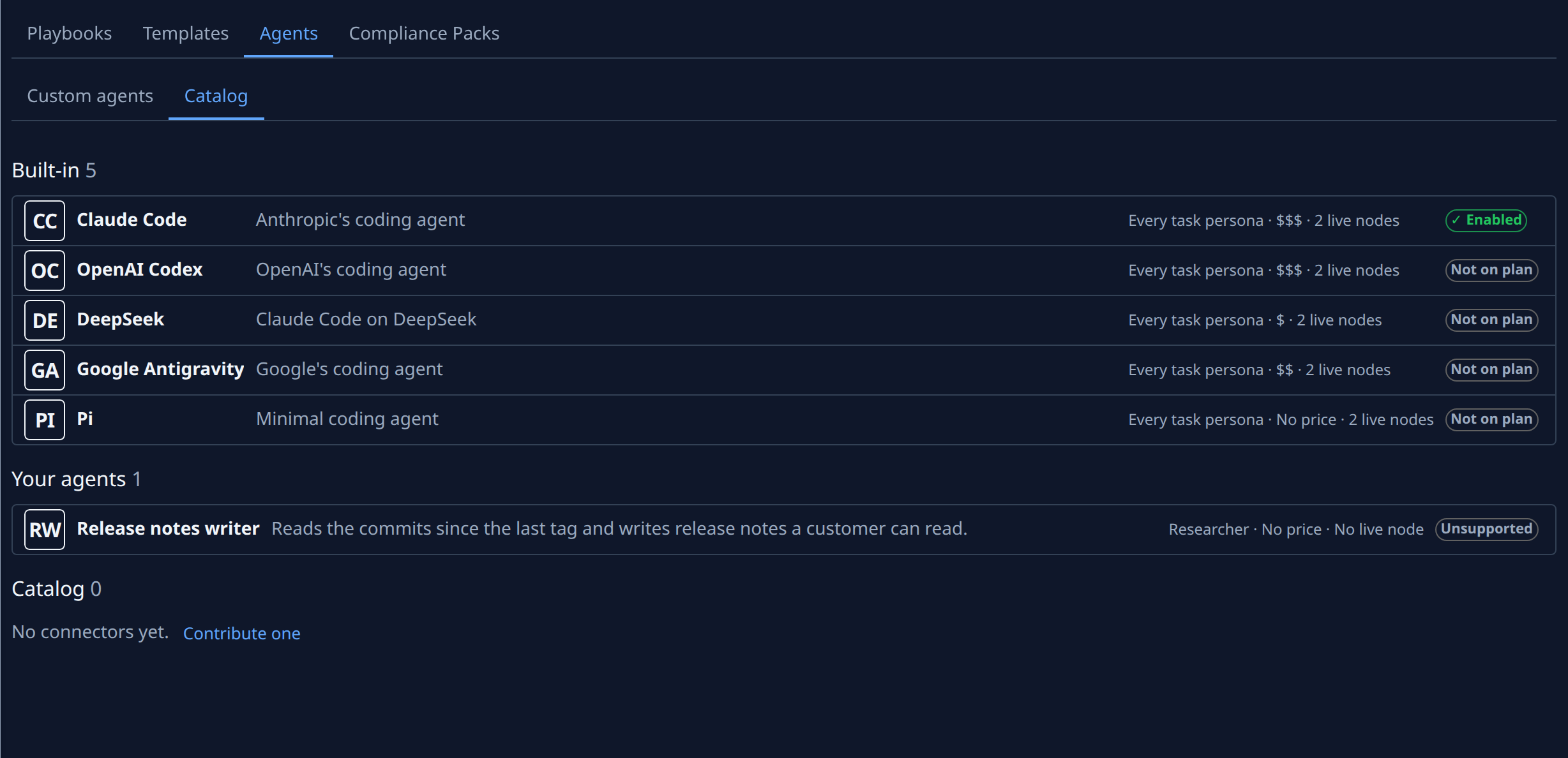
Agents sit in up to four sections, each headed by its name and how many it holds:
| Section | What it lists |
|---|---|
| Built-in | The agents Jaah runs itself. |
| Your agents | The agents your organization registered itself. Connectors and registry agents sit in their own sections. |
| Catalog | The shared connectors. With none, it reads No connectors yet. and Contribute one. |
| Registry | The agents your organization installed from the ACP registry. |
An empty section is left out, except Catalog. Each row shows the agent's initials, name and description, a facts line and a mark.
| Item | Meaning |
|---|---|
| Facts line | The personas it takes (a built-in agent reads Every task persona), its cost band ($ to $$$, or No price), and how many live nodes can run it, or No live node. Hover it for the full version: every persona, the price range per million output tokens, whether its accounts can take work, how its finished tasks turned out, and whether Jaah may pick it by itself. |
| Enabled | Tasks can use it. |
| Not on plan | A built-in agent your plan leaves out. |
| Off | A connector nobody in your organization turned on, or one of your own or registry agents that is disabled. |
| Unsupported | An SDK v1 agent. It has no button; hover the mark for why. |
| Removed from catalog | The connector was withdrawn. Tasks using it fail to start. |
| Enable or Disable | On a connector's row, for org admins. Enable is greyed when SDK agents are off for your organization; hover it for why. |
When a connector is listed, someone who may edit agents but is not an org admin reads Only admins can enable catalog agents. above the list. Every fact is explained on Check which agents can take work and Contribute a catalog connector.
Registry
Plan: the Registry tab shows only when your plan includes at least one ACP registry agent. Opening it without one shows Not on your plan, with See plans for an org admin and Ask an admin to change the plan. for everyone else. The organization these screens were taken in has no registry agent on its plan, so its list is described below and not pictured.

With the registry on your plan, the tab lists every agent of the public ACP registry as a card. Members who are not org admins read Only admins can install registry agents. above the list.
| Item | Meaning |
|---|---|
| Name | Searches the cards by name. |
| Distribution | All types, Binary, npm or Python. |
| Status | All statuses, Installed or Installable (not installed, and allowed). On a phone both filters sit in one Filters menu. |
| Card | The agent's icon, name and description, then its version, distribution, authors after by, and license. |
| Install | Org admins only. Pins the version shown; it reads Installing… until done. |
| Installed · pinned v | The version your organization installed. Hover it: Pinned. Installs on the node when a task runs. |
| Reason on the facts line | The agent can't be installed, so it has no Install; the reason follows its facts, for example No Linux build in the registry. These cards come last. |
When the registry lists no agent, the tab reads No registry agents. When nothing matches, it reads No matching agents with Clear filters. An installed agent is removed from the Custom agents tab with Delete. See Install an agent from the ACP registry and Get an agent your plan leaves out.