Drain or disable several nodes at once
Before maintenance on a host, or when a group of machines misbehaves, you can take many nodes out of service together instead of one row at a time. Drain lets each node finish the tasks it is running, then disables it. Disable stops new tasks at once. Neither stops a task that is already running.
Who can do this: anyone with permission to edit nodes. Without it, the bar doesn't offer Enable, Disable or Drain.
Take the nodes out of service
-
In the sidebar, select Directory, then the Machines tab.
-
Narrow the list to the nodes you want. Type part of a name or tag in Search, or set Status to Online and Enabled to Enabled, so only nodes that take work are shown.
-
Tick the box at the end of each node's row. To pick every node on the page, tick the box in the column's heading.
-
Read the bar that appears above the list. It says how many are selected, such as 2 selected, and offers Enable, Disable and Drain.

-
Select Drain to let running tasks finish first. It starts at once, with no question. Or select Disable, check the nodes named in the Disable 2 nodes? dialog, and select Disable.
-
Read the report above the list, such as Draining 2 of 2. A node that refused is listed under it with the reason. When every node succeeds, the ticks clear.
-
Check the Enabled column. A drained node keeps taking no new tasks and disables itself once its last task finishes.
An action no ticked node can take is greyed, and hovering it says why, such as No picked node is enabled and not draining.
Put them back in service
-
Tick the same nodes again. Setting Enabled to Draining or Disabled finds them.
-
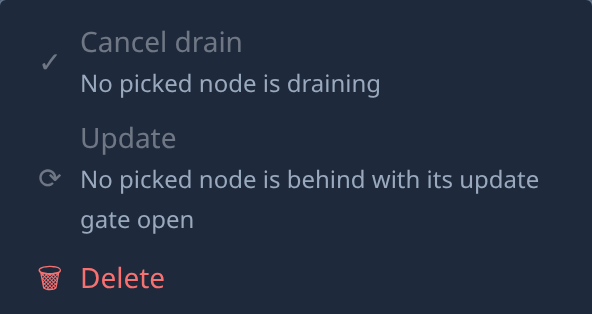
For nodes still draining, select ⋯ at the end of the bar, then Cancel drain.
-
For disabled nodes, select Enable on the bar.
-
Read the report, such as Enabled 2 of 2.
-
Check that Enabled shows ✓ on each row. New tasks start on them as soon as they have a free worktree.
The same bar's ⋯ also holds Update and Delete. Delete removes every ticked node and the worktrees on it, after you type the count, and can't be undone; read Delete a node first.
Related
- Drain or disable a node — the same actions on one node, from its row or its page.
- How nodes work — how Enabled, Draining and Disabled differ.
- Keep a node up to date — ask many ticked nodes to update at once.
- Nodes — every bulk action on the Machines tab.