Check what your organization pays for
Check this before a renewal, when a charge surprises you, or when you want to know whether a node or a product is paid for or included. The Products tab of Billing lists everything your organization holds, and the line above the tabs says what is charged next.
Who can do this: Org Owners and Admins. Other members don't see Billing; ask an Owner or Admin.
Read the next charge and your plan
-
In the sidebar, select Settings, then Billing under Organization. The Products tab opens.
-
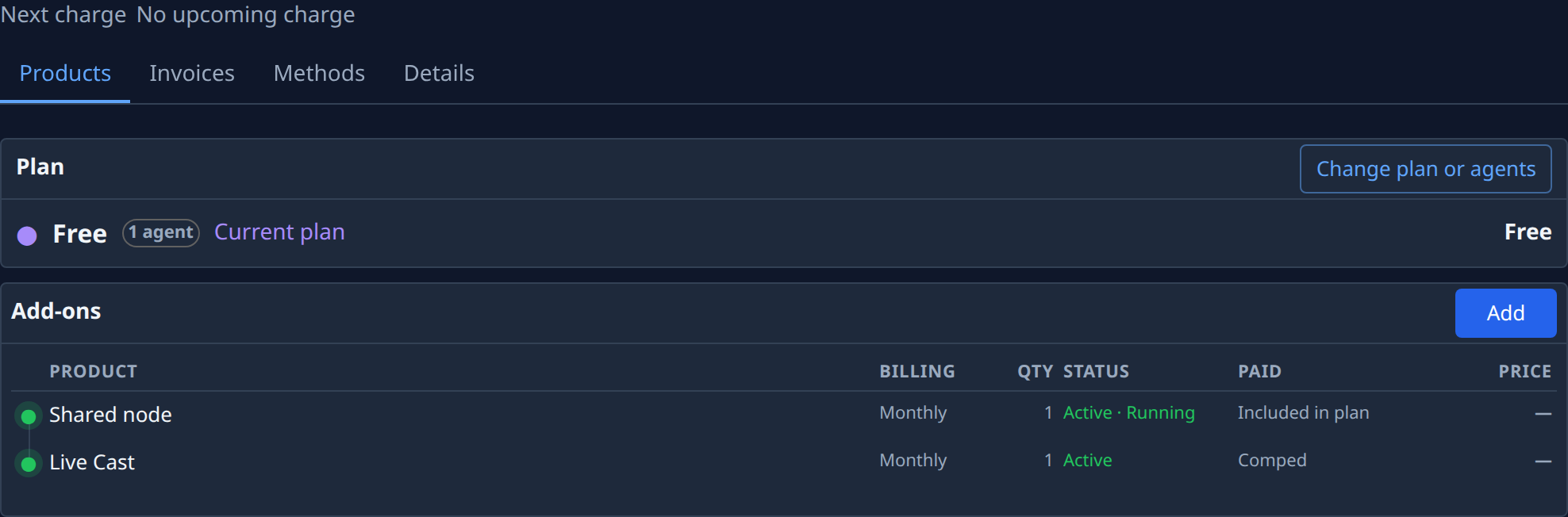
Read Next charge above the tabs: an amount and a date, or No upcoming charge when nothing is due. If you pay for hosting as well as a plan, two lines show instead, Next plan charge and Next hosting charge.
-
Read the Plan card: your plan's name, how many agents it holds, its state (for example Current plan), and its price per period on the right, or Free.
Read your add-ons
-
Under Add-ons, read one row per product your organization holds besides the plan:

Column What it tells you Billing How often it is billed, for example Monthly. Hover it for the product's kind and options. Qty How many you hold. Status Its state, then a hosted node's own state, for example Active · Running, and when it renews or ends. Paid How it is paid: Included in plan for a node your plan includes, Comped for one given to you free. Price What it costs per period, or — when you pay nothing for it. -
To see a hosted node's price and period in full, select its name. Its page opens beside the list with Hosting, Billing and Price under Details. Select ✕ to close it.
-
To see what was charged in the past, select the Invoices tab. Each invoice shows its number, status, date and amount; No invoices yet means nothing has been billed.
What to do next
- To stop paying for an add-on, see Cancel or remove an add-on.
- To change your plan or its agents, see Change your plan.
- To check how much of each limit you use, see Check your plan and limits.
Related
- Billing: every part of the Products tab.
- Download or pay an invoice: open a past invoice and its lines.
- How plans and billing work: plans, add-ons and when each is charged.