Check what a finished epic delivered
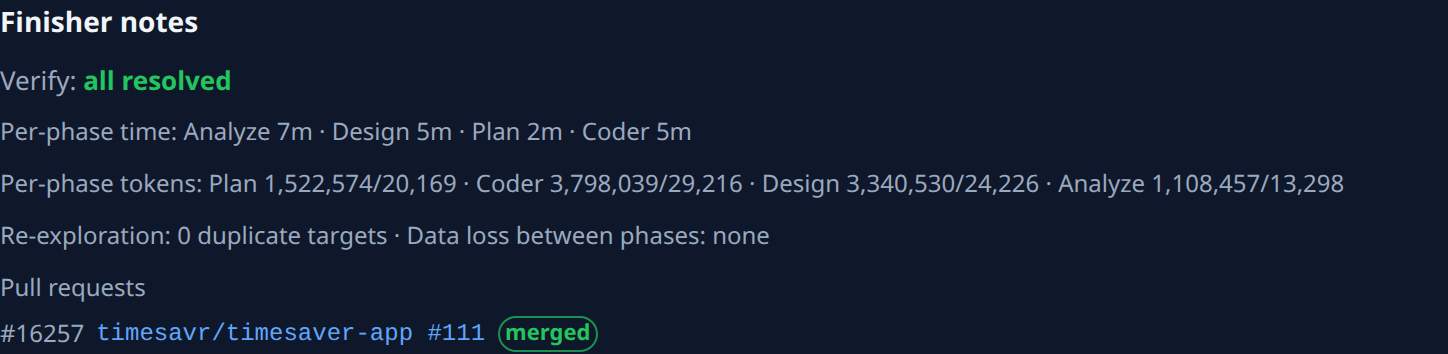
An epic ends with its Finish stage, which checks that the subtasks' work, taken together, does what you asked. What it found is kept on the epic itself, under Finisher notes: whether anything was left undone, every pull request the subtasks opened, any follow-up tasks it filed, and how long and how many tokens each stage took. Read it before you tell anyone the work has shipped.
Who can do this: anyone who can see the epic. Starting a subtask again needs the right to run tasks on its project.
Read the Finisher notes
- Find the epic on the board, usually under Done, and select its title. Its page opens.
- Select the Details tab, then Summary.
- Scroll to Finisher notes. Until Finish has run, it says No finisher notes yet.
- Read the Verify line. all resolved means every subtask delivered; a red count, such as 2 unresolved, means something did not, and each item is listed below it.
- Under Pull requests, check each subtask's pull request and its state, such as merged. The number before it is the subtask's; select the pull request to open it on your forge.
- If the notes list Finish-filed follow-up tasks, find each by its number on the board. They are new tasks Finish filed for gaps it found; they don't count as unresolved.
- For the full report, open the Subtasks tab, select the Finish subtask and open its Artifacts tab.
Follow up what is unresolved
Each unresolved item names a subtask by its number. Open it from the Subtasks tab:
| Item | What it means | What to do |
|---|---|---|
| Unresolved coder child | A build subtask did not finish; its state is in brackets. | Read why, fix it and start it again: see Get a failed epic going again. |
| Missing analysis artifact | An Analyze, Design or Plan subtask left no document. | Check that subtask's Artifacts tab, and run it again if it is empty. |
| Orphaned fan-out | Plan tried to split the work into build subtasks and did not manage it; the count of attempts is in brackets. | Read the Plan subtask's result, then run the epic one stage at a time or reset it. |
| Plan → coder append still pending | Build subtasks from the plan are still being added. | Wait a few minutes and open the epic again. |
See what each stage took
The other lines of Finisher notes show the cost of the run:
- Per-phase time and Per-phase tokens: the time and tokens in and out each stage used, such as Analyze or Coder.
- Re-exploration: how many times a later stage looked again at what an earlier one had already covered. Data loss between phases: what a stage did not pass on to the next. none is what you want.
The Metrics tab, beside Summary, holds the run's totals: run time, tokens, cost estimate and peak memory and CPU.
Related
- How an epic moves through its stages: How epics and features work.
- Read one task's result the same way: Read a task's result.
- What the epic decided before it built: Review an epic's requirements, design and plan.