Change a model account's owner
A model account is either the organization's or one member's. An Organization account belongs to the organization; a Personal account belongs to its owner. Either one serves the people and groups on its Access list. Change the owner when a member leaves, or when an account someone added for themselves should serve the team. The account keeps its sign-ins, its quota and its settings; nothing needs to be added again.
Who can do this: Org Owners and Org Admins, on any account they can see, a member's personal account included. Anyone else sees Read-only — only an administrator can change an account.
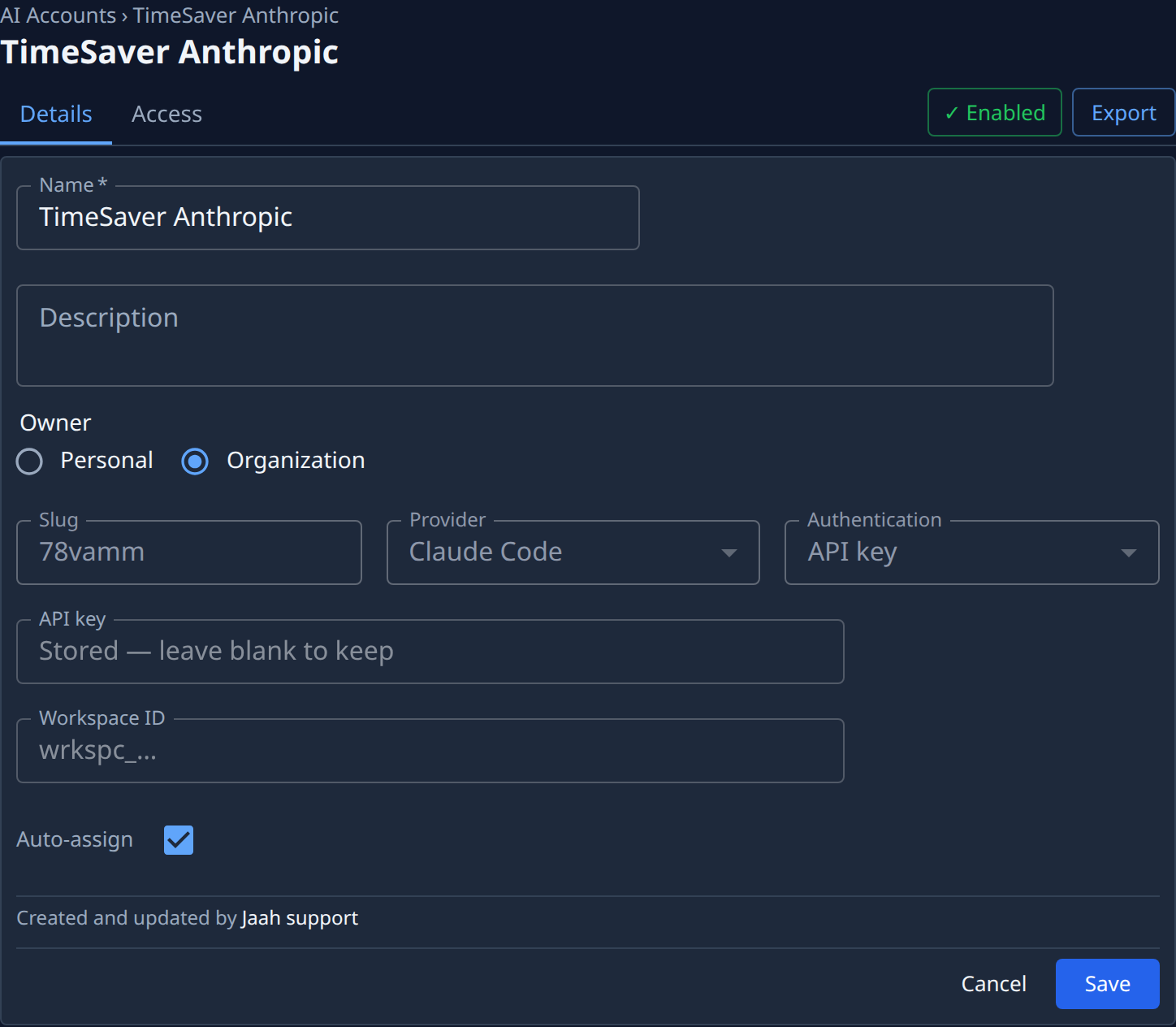
- In the sidebar, select Directory, then AI Accounts.
- Select the account's name, or Edit in its ⋯ menu. It opens on the Details tab.
- Under Owner, see who owns it now.
- Pick the new owner:
- Organization, to share it across the organization.
- Personal, then type part of a member's name or email in Owned by and pick them.
- Select Save. The list opens again.
- Open the account's Access tab and check who may use it now. Add people or groups there if the new owner alone isn't enough: see Share a model account with people.
An API-key account's key moves with the account, so its secret changes owner too. A key that belongs to a model account can't be moved on its own from Secrets.
Related
- How Jaah picks an account for each run: How model accounts work.
- Every field on the account's page: Model accounts.
- Moving an ordinary secret instead: Change a secret's owner.