Fix a NodeLink a node can't mount
When a task on one node can't find files that tasks on other nodes can, the NodeLink is probably not mounted on that node. The node's NodeLinks tab says, for each NodeLink attached to it, whether it is mounted and, when it isn't, why.
Who can do this: anyone who can see the node. Attaching and detaching requires the org admin role. Changing a NodeLink's storage needs the permission to edit credentials. The tab shows only while your plan includes NodeLink.
-
In the sidebar, select Directory, then Machines; the Nodes tab opens. Select the node.
-
Select its NodeLinks tab. Each attached NodeLink is a row with its name, the path it mounts at on this node, and its state. A node with none reads No NodeLinks attached., with the NodeLink picker and Attach below it.
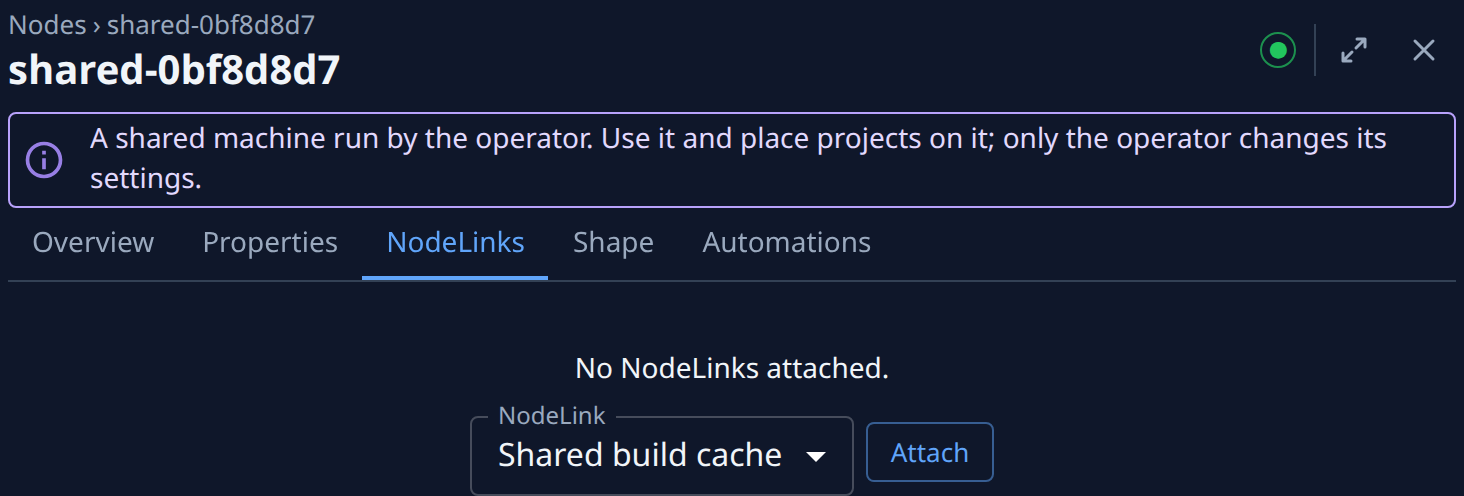
-
Read the state of the NodeLink you need: Mounted, Not mounted, Needs permission, Unknown or Not set up yet. When it isn't mounted, the reason the node gave is under the row, in full; hover the state to read it too.
-
Fix it by what it says:
- Needs permission: the node is a Mac that blocks the share. Grant it Full Disk Access; see What a Mac needs.
- Unknown or Not set up yet: the node hasn't reported on this NodeLink yet. Check that it is online; see Read a node's status.
- Not mounted, and the reason says the file system's name couldn't be found or that the node is outside the file system's VPC: select Storage › Mount target IP › Change under the reason. On storage that uses a file system you already had, select Change beside Mount target IP, pick a mount target under Mount target and select Save. Then route the node to that address. Without the permission to edit credentials, the line reads Ask an admin to set its mount target IP. instead.
- Not mounted with Not in the file-system policy.: see Repair a NodeLink's file-system policy.
- Not mounted with a timeout or a refused connection: the node has no route to the file system. See Set up the network for NodeLink.
-
Come back to the node's NodeLinks tab after the fix. The node checks its mounts again by itself; wait until the row reads Mounted.
-
If the node should not have this NodeLink at all, select ⋯ on its row, then Detach, and confirm Detach in the Detach NodeLink? dialog. It unmounts from this node only.
Related
- How NodeLink works: what each state means and how a node reaches the files.
- Attach a NodeLink to nodes: attach it to more nodes, or attach it again.
- Nodes: every field on a node's NodeLinks tab.