Task board
A task is one piece of work you hand to Jaah: you describe it, a runner does it, and the result comes back to the task. The task board lists your organization's tasks. It's the page Jaah opens after you sign in.
To create a task, see Start a task. To reply when a task asks you something, see Answer a task's question. To stop, restart or reset one, see Stop, restart or reset a task. For the ideas behind tasks and their states, see How tasks work.
The board
Select a project or a feature in the sidebar to see only its tasks. All projects shows every task you can see.

| Control | What it does |
|---|---|
| Search tasks | Finds a task by its number, or by a word in its title or description. |
| First button | Switches between the flat list and the tree of projects and features. |
| Second button (Focus) | Hides finished and archived tasks. Select it again to show them. |
| Third button (Filter & view) | Opens Filter & view. |
| + | Opens a new task. See New task. |
| ▼ | Opens the menu below. |

- Task — a new task. Same as +.
- Feature — a new feature, a folder for related tasks in a project. See Feature.
- Chat — a conversation with an advisor. See New chat.
Under the toolbar, the row Type a task and press Start… creates a task in one line. See Start a task.
If you can't create tasks, the board has no +, no Task item and no one-line row.
Sections
In the flat list, tasks are grouped by state:
| Section | Holds |
|---|---|
| Stopped | Tasks that need you: a question to answer, a failure, a task paused by hand, or one waiting on a customer. |
| In progress | Tasks queued, starting or running. |
| Draft | Tasks saved but not started. |
| Done | Finished tasks. Select ▼ beside it to fold it away. |
Select a task's title to open it beside the board. What the task page shows is in Task page.
Each row shows:

| Item | Meaning |
|---|---|
| Status icon | The task's state. Hover it for its name. See States. |
| Number | The task's number. Search finds a task by it. |
| Title | Generated from the description when you don't give one. Select it to open the task. |
| + before the title | The task has subtasks. Select + to show them. |
| Persona | The kind of expert that runs it, such as Coder, Researcher or Epic. |
| Rating | A finished task's average rating out of 5, with a star. Shown once someone has rated it on its task page. Hover for how many ratings it has. |
| Cost | What the task's runs have cost so far. |
| Initials | Who created it. Hover for the name. |
| Age | How long ago it last changed. |
| ⋯ | The same menu as on the task page. See The ⋯ menu. |
Filter & view
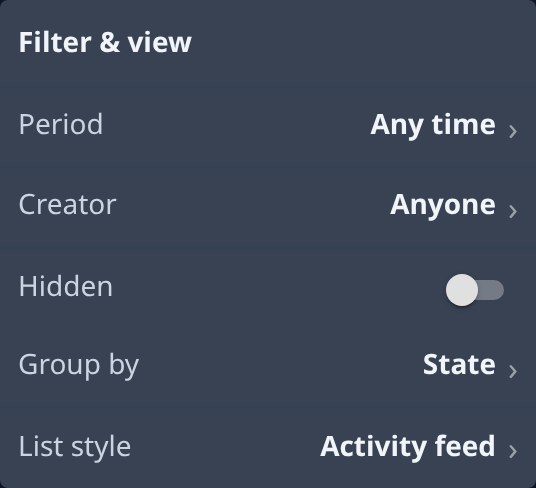
| Setting | What it does |
|---|---|
| Period | Shows tasks from one period only. Any time shows all. |
| Creator | Shows the tasks some people created. Anyone shows everyone's. |
| Hidden | Also shows hidden tasks: system and archived ones. |
| Group by | Groups the flat list by State (the default), feature, project, or a tag group. None turns grouping off. Project is offered under All projects only. |
| List style | How the flat list is drawn. Activity feed is the default. |
The button shows a count when a filter is hiding tasks.
States
| State | Meaning |
|---|---|
| Draft | Not started. Press Start to queue it. |
| Queued | Started, waiting for a runner. |
| Waiting | Waiting for a task it depends on to finish. |
| Held | An epic that dispatches only the subtasks you press Run on. |
| Starting | A runner is being dispatched. |
| Running | A runner is working on it. |
| Asking | It needs your answer before it can go on. |
| Delivering | Your answer is recorded and on its way to the runner. |
| Failed | It used up its attempts. It needs your attention. |
| Paused | Stopped by hand. Review it, then start or reset it. |
| Done | Finished. |