Count what your agents produced
Merged pull requests are only part of what your agents hand back. They also write PRDs, architecture docs, reports and other files that they attach to their tasks. The Delivery tab of the command center counts all of it for the range you pick, so you can answer "what did we get out of the agents this month?" in one place.
Who can do this: requires the org owner or org admin role. Members don't see Reports in the sidebar.
-
In the sidebar, select Reports. The command center opens.
-
In the bar, pick the range, such as 30d for a monthly summary. To count one project only, pick it in Project.
-
Select the Delivery tab and scroll past Tasks by state, Created vs done and Open epics to the row of tiles.

-
Read the code tiles: Lines added, Lines removed and Net lines (added minus removed). They count the pull requests merged in the range only, and leave out dependency lock files, copied-in third-party code and generated code. With no merged pull request in the range they show — and no merged PRs in range.
-
Read the document tiles: PRDs, Architecture docs, Reports and Files delivered. Each counts the files of that kind your agents attached to tasks in the range. Another kind of file gets its own tile, named after the kind, such as Mockup artifacts. Hover a tile to read what it counts.
-
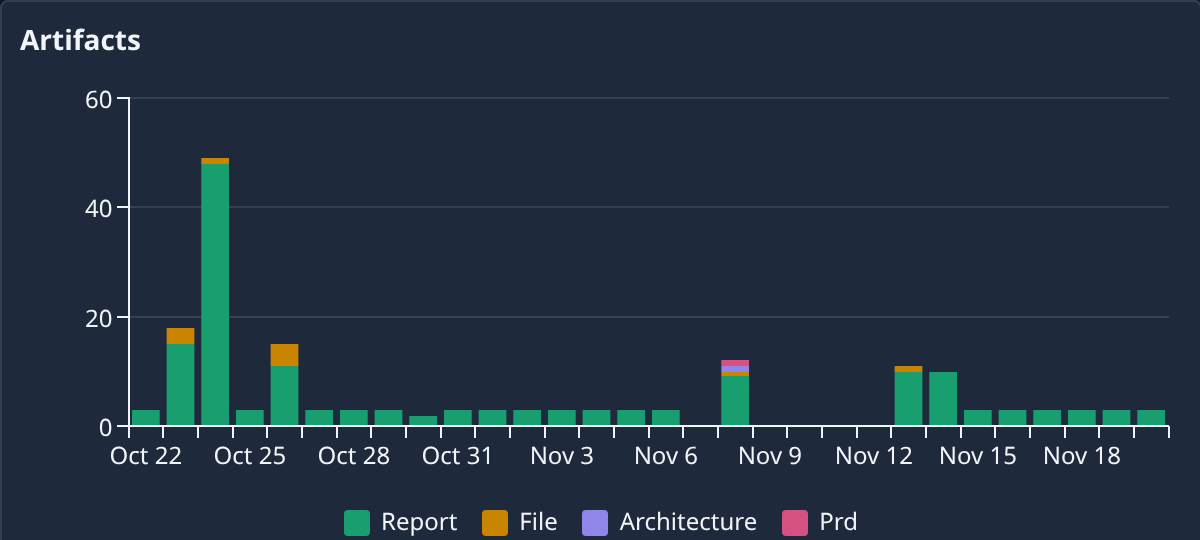
Scroll down to the Artifacts chart. Each bar is one day (or hour, on a short range), split by kind, so you can see when the agents produced the most and what kind of work it was.
-
To open the files themselves, go to the Tasks board, open the task that produced them and select its Artifacts tab.
The range, project and tab are kept in the page's address, so you can bookmark this view or share it with another Owner or Admin.
Related
- Check what your team delivered: tasks by state, open epics and what shipped.
- Read a task's result: the report and files one task handed back.
- Read the command center: every tab, tile and health state.