Find out why tasks closed without a pull request
Not every task ends in a pull request. An agent may find the change is already on the branch, or that the request needs no code at all. A few of those are normal; a lot of them can mean tasks are filed twice or written so the agent has nothing to build. The command center's Delivery tab counts these endings and splits them by reason.
Who can do this: requires the org owner or org admin role. Members don't see Reports in the sidebar.
-
In the sidebar, select Reports. The command center opens.
-
In the bar, pick a range long enough to show a pattern, such as 30d or 90d. To look at one project, pick it in Project, which starts on All.
-
Select the Delivery tab and scroll past Created vs done to the tiles.
-
Read No-PR closes beside PRs merged: how many tasks in the range finished without a pull request, against how many merged one. The small line under each figure shows when they happened.
-
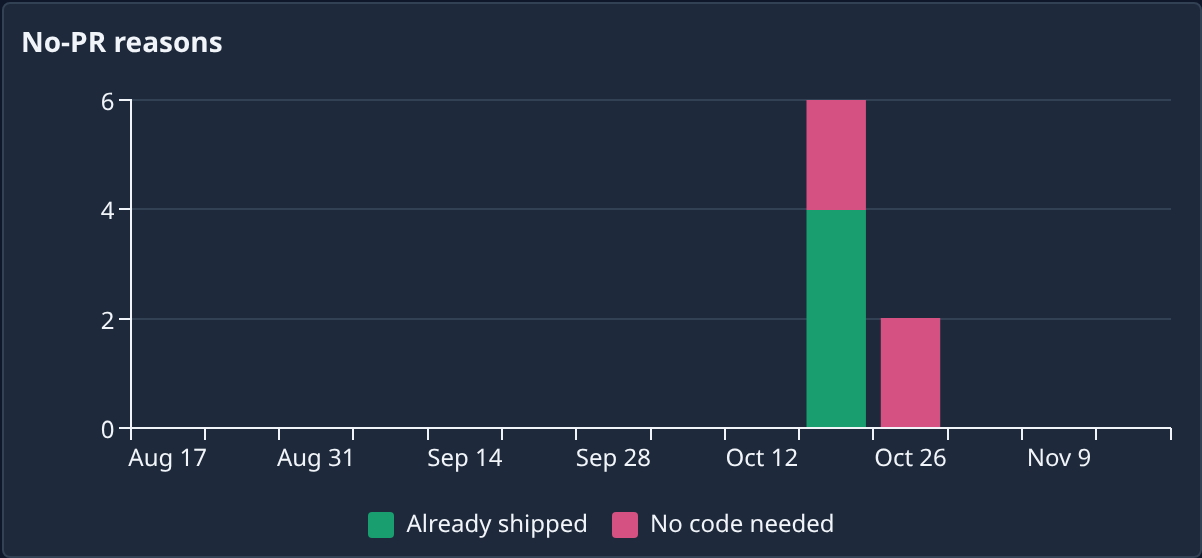
Scroll down to No-PR reasons, beside Tasks done. Each bar is a stretch of time, split by reason, such as Already shipped or No code needed. Hover a bar to read each reason's count.
-
Look for the reason that dominates. Already shipped means the change was already on the branch when the agent looked, often because another task delivered it first. No code needed means the request was answered without a change, such as a question or a check.
-
To see the tasks themselves, scroll up to Tasks by state and select the Done count. The task board opens filtered to the finished tasks.
-
Open a task and select its Details tab. Under Outcome, a task that ended without a pull request says closed with no PR and the reason, with the agent's Evidence below it.
If Already shipped keeps climbing, look for tasks that ask for the same change. If No code needed is high for a project that should be building, the requests may need to say what change is wanted.
Related
- Check what your team delivered: the rest of the Delivery tab.
- Read a task's result: what a finished task's outcome says.
- Read the command center: every tab and tile.