Make an epic wait for another task
Some large work has to wait for other work: a feature built on an API another task is still writing, or a redesign that should start only after a migration has shipped. Give the epic that task as a prerequisite. An epic's prerequisite holds back the whole epic: none of its subtasks starts, Analyze included, until the prerequisite is done and its change has merged. You don't have to add it to each subtask.
Who can do this: anyone who can edit the epic. If you may only create tasks, you can set prerequisites on your own draft epics.
-
Open the epic from the task board and stay on its Task tab. On a new epic, pick Epic in the size list of the new task form instead.
-
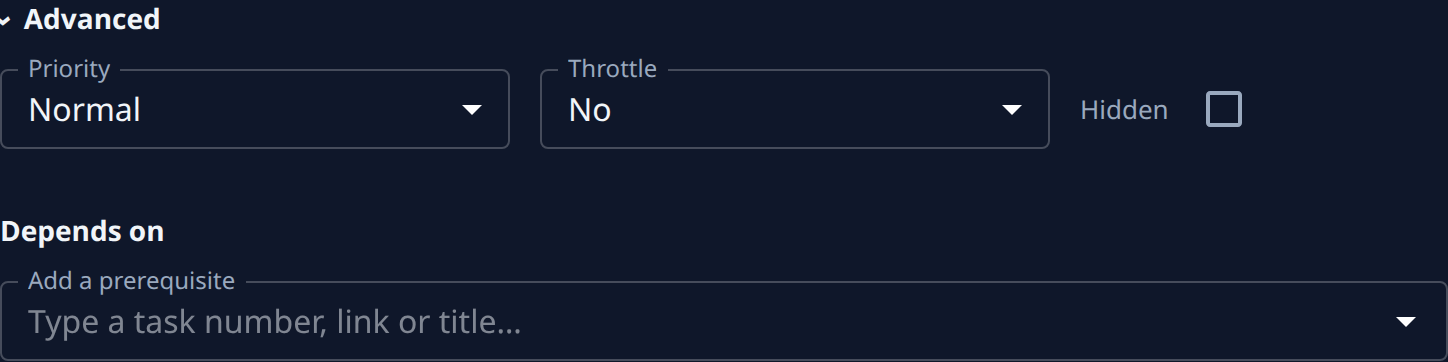
Select Advanced. Depends on is at the end, under Priority and Throttle.
-
In Add a prerequisite, type the other task's number, its link or part of its title. A finished task is offered only when you type its number or link.
-
Pick the task from the list. It joins the list under Depends on, marked unsaved. Add more the same way if the epic should wait for several.
-
Select Save, or Go to save and start the epic in one step. Jaah refuses a prerequisite that could never finish first, such as one of the epic's own subtasks, and says why.
-
Start the epic as usual if you only saved it. While a prerequisite is unfinished, the epic shows Waiting on the board instead of Running, and its subtasks show Waiting under it.
-
To see what it waits for, open the epic's Details tab: ⛔ Blocked by names each unfinished prerequisite, with a link to it. A prerequisite that is done but whose change is still merging keeps blocking, marked merging under Depends on.
-
When the last prerequisite is done and merged, the epic starts by itself, beginning with Analyze.
Run on a held subtask doesn't skip the wait: the subtask still waits for the epic's prerequisites. If you add a prerequisite to an epic that is already running, subtasks already at work carry on; the ones not started yet wait.
Remove a prerequisite
To let the epic go ahead without waiting, open its Task tab, select Advanced, select ✕ on the prerequisite's row under Depends on, then Save.
Related
- Make a task wait for another task: the same field on a single task, and the Blocks list that shows what waits on a task.
- Start an epic and follow its stages: what happens once the epic starts.
- Limit how many subtasks run at once: Throttle, the other way to hold an epic's subtasks back.
- How epics and features work: the stages and how an epic's state follows its subtasks.