Make a task wait for another task
Some work only makes sense once other work is finished: a migration before the feature that uses it, an API before its client. Add the first task as a prerequisite of the second. Once you start the second task, it waits until every prerequisite is done and its change has merged, then runs.
Who can do this: anyone with permission to edit the task. Members who may only create tasks can set prerequisites on their own drafts. Re-run also needs permission to start tasks.
Add a prerequisite
-
Open the task that should wait, and stay on its Task tab.
-
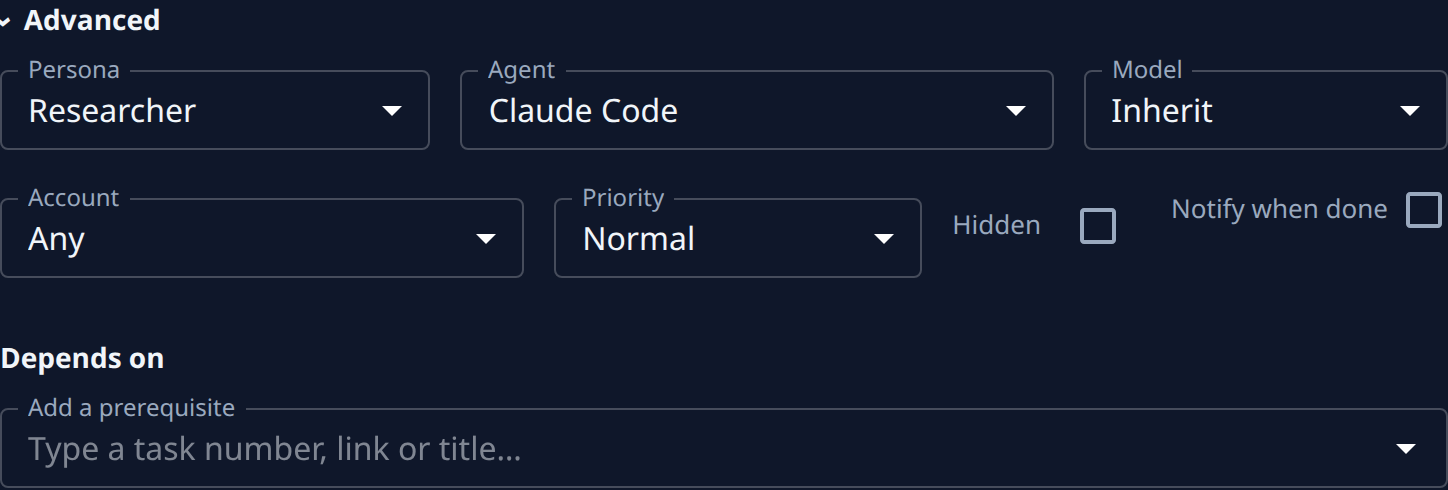
Select Advanced to open it. Depends on is at the end.
-
In Add a prerequisite, type the other task's number, its link or part of its title. The box says Type a task number, link or title… until you type.
-
Pick the task from the list. It joins the list under Depends on, marked unsaved. Add more the same way if the task should wait for several.
-
Select Save. Jaah refuses a prerequisite that would make two tasks wait on each other, and says why.
-
Start the task as usual. While a prerequisite is unfinished, the task shows as Waiting on the board and its Details tab reads ⛔ Blocked by, naming each task it waits for.
A finished task is offered only when you type its number or link. A prerequisite that is done but whose change is still being merged keeps blocking, marked merging.
See what a task blocks
Open the prerequisite and select its Details tab. Blocks lists every task waiting for it, or says Nothing depends on this task.

Re-run or remove a prerequisite
Each prerequisite's row under Depends on carries its actions:
- ✕ (Remove) takes it off the list. Select Save to keep the change.
- Re-run starts the prerequisite again. It appears when the prerequisite is marked stale: a task it depends on changed after it finished, so its result may be out of date.
How tasks move between states, Waiting included, is in How tasks work. Starting the task once its prerequisites are set is in Start a task.