Delete many secrets at once
When a project ends or a service is retired, you may have a page of secrets to clear out. Instead of deleting them one by one, tick them in the list and delete them together.
Who can do this: anyone, for secrets they may delete. If you may not delete one of the ticked secrets, the whole delete is refused, nothing is removed, and the message names the secret.

- In the sidebar, select Directory, then the Secrets tab.
- If the list is grouped into folders, turn off Tree view at the end of the filters to go back to the flat list. Ticks are only in the flat list.
- Narrow the list with Search and the filters until it shows the secrets to remove, for example everything of one type or one owner.
- Tick the box at the right end of each secret's row. To take every row shown, tick the box in the header row. A line then says All N shown are selected.; select Select all N matching to take every secret the filters match, not just the ones loaded.
- Check the count on the bar above the list, for example 2 selected. Select the × beside it to start over.
- Select Delete on the bar.
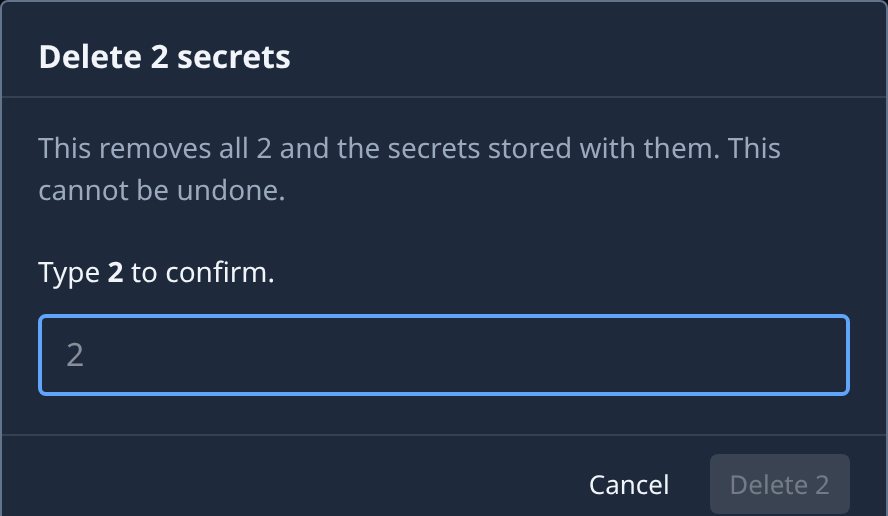
- Read the dialog. It says how many secrets go, and that this cannot be undone. When the selection holds your organization's only GitHub secret, a warning above says so.
- For more than one secret, type the count in the box (Type N to confirm.). Then select Delete N, or Cancel to keep them.
- Check the message saying how many were deleted. The list reloads without them.
When the delete is refused
The delete is all or nothing. Nothing is removed when:
- you may not delete one of the ticked secrets;
- the secrets matching the filters changed since you confirmed: check the list and try again;
- one of them holds the storage of a NodeLink Jaah manages. Delete that NodeLink first, see Delete a NodeLink and its storage.
One delete takes at most 10,000 secrets. Over that, Delete is greyed out: narrow the filters first. Changing a filter or the order clears your ticks.
Related
- One secret at a time, or a new value instead of a delete: Replace or delete a secret.
- File secrets under a folder instead: Move secrets into a folder.
- Find the expired or unused ones first: Find secrets that need attention.
- The list's checkboxes and bar: Secrets.