Run a project's outcome scan now
The outcome scan reads a project's repository for merged work that was later reverted or fixed. What it finds feeds the outcome figures you compare agents and models by. It runs by itself every so often. Start one by hand when the last scan is old, or right after a revert you want counted.
Who can do this: anyone who can edit the project sets the interval. Reading the scan's state and Scan now require the org owner or org admin role.
Plan: the Outcome scan section shows only where your plan includes agent performance, and only on a project with a repository.
-
In the sidebar, select Directory, then the Projects tab.
-
Select the project's name, then the Settings tab, then Testing.
-
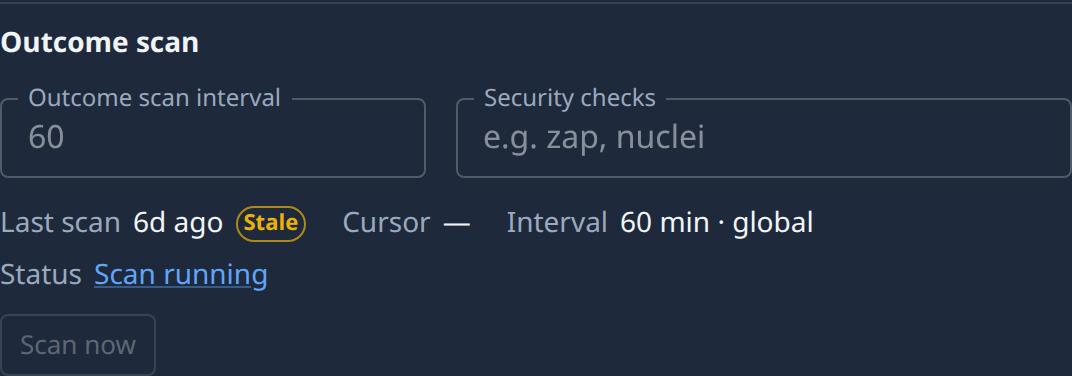
Under Outcome scan, read the state:
- Last scan: how long ago the last scan started, or Never. Stale beside it means the scan still running has taken longer than the interval.
- Cursor: the commit the scan has read up to, or — before the first one.
- Interval: how often it runs, and where that comes from: project, org or global.
- Status: Scan running, while one runs, links to the scan's task.
-
Select Scan now. It is unavailable while a scan runs, because a project runs one at a time: open Scan running to follow that one, and on a Stale scan, see why its task is stuck.
-
Read the result. Scan running appears with a link to the new scan's task. When Jaah can't start one, the reason shows beside the button, such as A scan is already running.
-
Optional: to change how often it scans, type the minutes in Outcome scan interval, from 15 to 1440, and select Save. Leave it blank to use your organization's value, or Jaah's default.
A warning No git person — scans can't run means nobody can run the scan. Set Run jobs as on the project or the organization, as in Choose who background jobs run as.
Related
- Compare agents and models by outcome — where what the scan finds is counted.
- Set how runners push to a repository — the rest of the Testing section, Security checks included.
- Projects — every field on the Settings tab.