Give someone the same access as a teammate
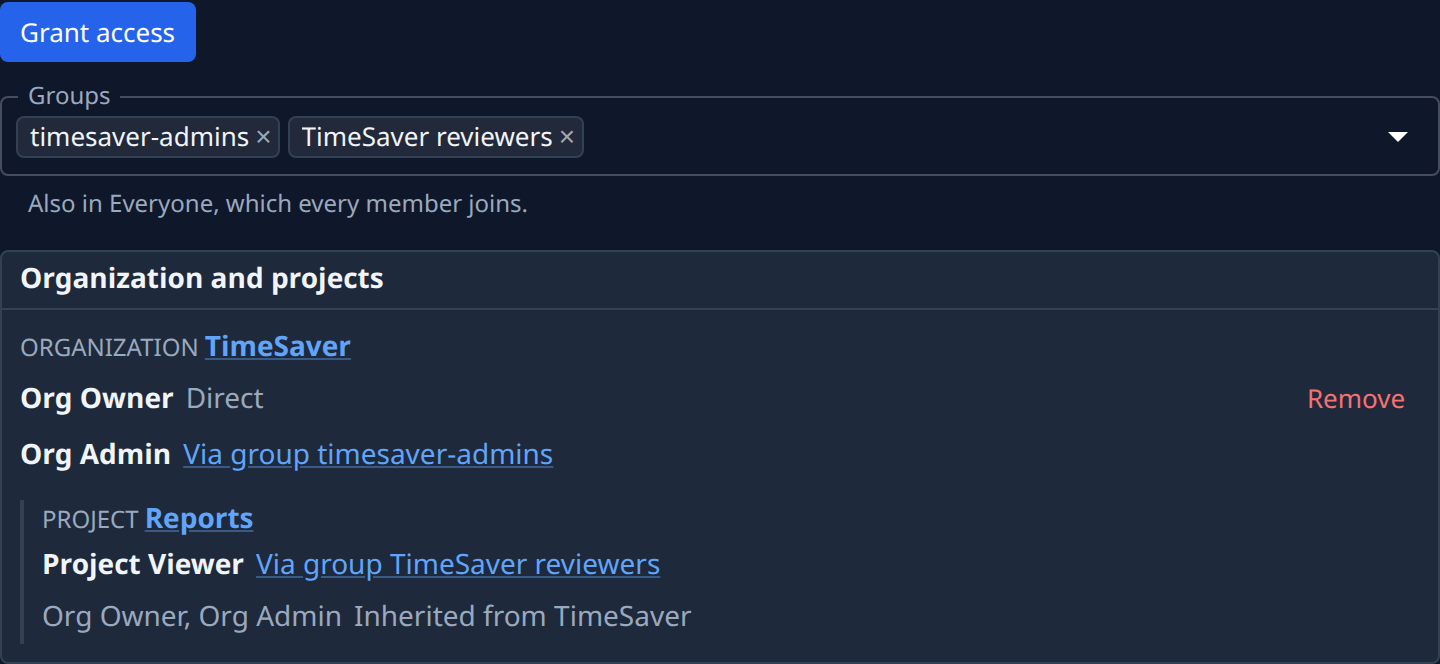
Jaah has no copy button for access. To give a new person what a teammate already has, read the teammate's Access tab, then give the new person the same groups and the same Direct roles. Groups carry most of it: every role a group grants comes with it.
Who can do this: changing groups and granting roles requires the org admin role. Only an Org Owner can grant Org Owner.
Read what the teammate has
- In the sidebar, select Directory, then the People tab.
- Select the teammate's row, then the Access tab.
- Note the chips in Groups. Everyone is not among them: every member is in it already.
- Under Organization and projects, note each line marked Direct, and its organization or project. Lines marked Via group come with the groups, and lines marked Inherited from come with an organization role, so skip both.
- Under Accounts, if the section shows, note each Direct line there too.
Give the new person the same

- Back on the People tab, select the new person's row, then the Access tab. If they aren't in your organization yet, invite them first: see Invite a person and grant access.
- Select Groups and pick each group you noted. Each one is added at once; there is nothing to save.
- For each Direct line you noted, select Grant access.
- Pick the Type, for example Organization or a project, then the thing itself and the Role.
- Select Grant. The line shows as Direct.
- Compare the two Access tabs. The new person should show the same lines under the same organization, projects and accounts.
To be sure the new person can do one thing the teammate does, use the Check tab: see Check what someone can access.
If several people need the same access, a group is easier to keep in step than Direct roles: grant the roles to a group once and add people to it. See Create a group.
Related
- Add someone to groups: change one person's groups, or many people's at once.
- How team and access work: roles held Direct, Via a group, or Inherited from the organization.
- People: every tab of a person's account.