Read a task's delivery record
Jaah keeps a record of every run of a task, from the moment it was ready to the moment its change merged and lasted. The record shows who ran it, how long each step took, and how much trouble the change met on its way in: failed checks, late pushes, security findings. Read it to see why a change was slow to land or to compare one run with another.
Who can do this: anyone who can view the task. The Outcome tab needs agent performance on your organization's plan, and shows once the task has run.
-
On the task board, select the task's title. Its page opens beside the board.
-
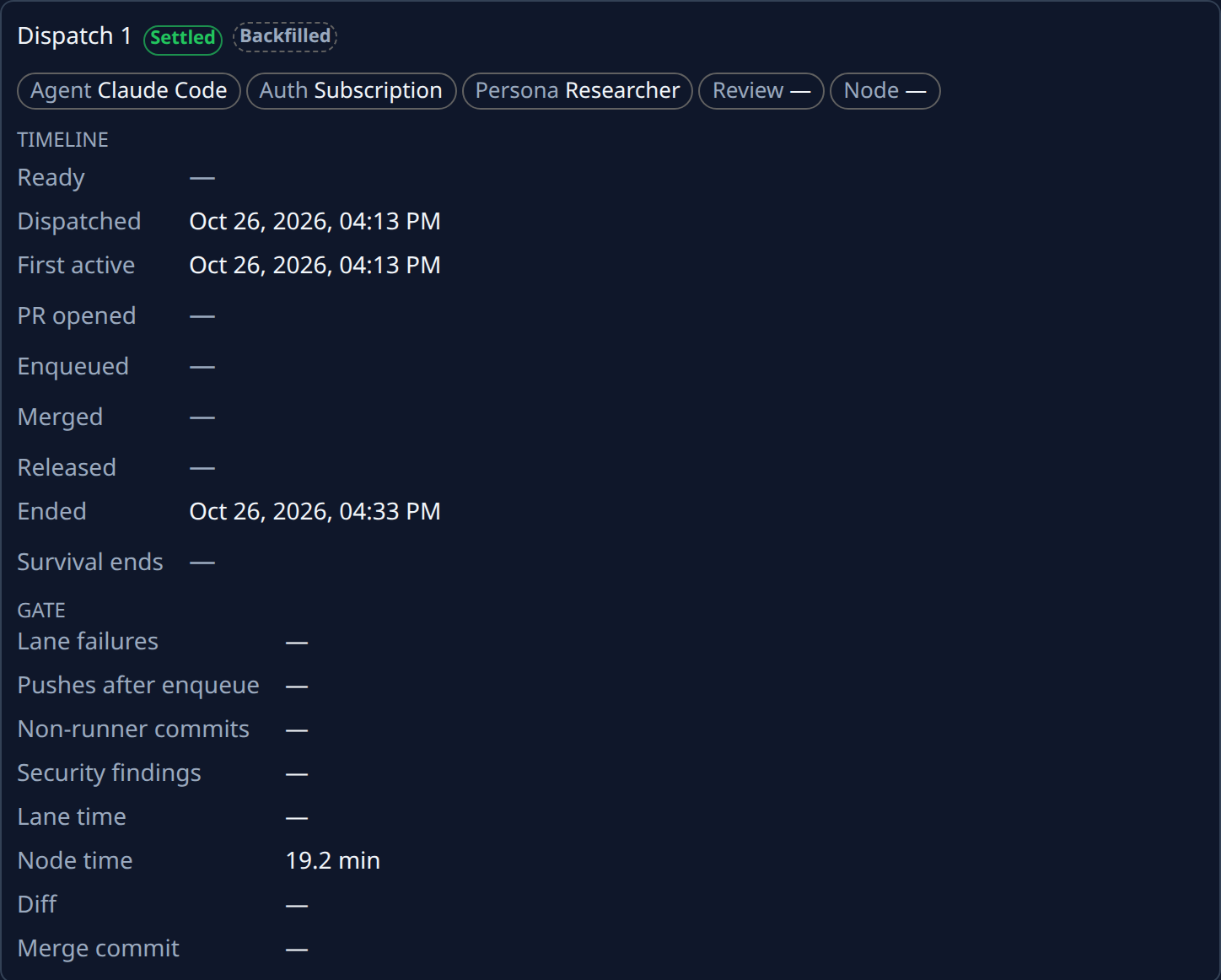
Select the Details tab, then Outcome. Each run has its own card: Dispatch 1 for the first run, Dispatch 2 for the next. The chip beside the heading is the run's state, such as Merged, Survived or Reverted. Hover it for what it means.
-
Read the chips under the heading. They say what ran the attempt: Agent, Auth (Subscription or API key), Persona, Review and Node (such as Jaah Cloud · MicroVM). A fact Jaah doesn't know shows a dash.
-
Under Timeline, read when the run reached each step: Ready, Dispatched, First active, PR opened, Enqueued, Merged, Released, Ended and Survival ends. A step the run never reached shows a dash. Until Survival ends passes, Jaah still watches the change for defects.
-
Under Gate, read how the change fared once it joined the merge lane:
- Lane failures: how many times the lane's checks failed on it.
- Pushes after enqueue: commits pushed after it joined the lane.
- Non-runner commits: commits on the pull request that didn't come from the runner.
- Security findings: how many security problems review found in it.
- Lane time and Node time: minutes in the merge lane, and minutes the agent ran on its node.
- Diff: lines added and removed, and how many files changed.
- Merge commit: the start of the commit it merged as.
-
Compare the cards when a task ran more than once. A run that hit lane failures or needed a person's commits shows it here.
-
If the card has Defect links, follow Confirm or dismiss what broke a task's change to judge each one.
A card can carry a badge beside its state. Backfilled means Jaah built the record from history, so only the merge, lane and cost facts are there. Shadow marks a benchmark run that never merges. Excluded means the run is left out of every metric; hover it for why.
A task picked for a benchmark also shows a Benchmark duel card above the runs. Its Diff distance says how different the two setups' changes were. See Compare agent setups with benchmark mode.
Related
- Confirm or dismiss what broke a task's change: judge the defects Jaah traced to a run.
- Read a task's result: the runner's summary, its pull requests, and the run's cost.
- Task page: every tab of the task page.