Show a task's subtasks on the board
An epic splits its work into subtasks, and the board shows only the epic's row at first. Unfold the row to see every subtask under it without leaving the board: which ones are done, which still run, and what each one cost.
Who can do this: anyone who can view the task.
-
On the task board, find the task. A task with subtasks has ▸ before its title. A finished one may sit under Done, folded under its release: select ▸ beside Done, then beside the release, to open them.

-
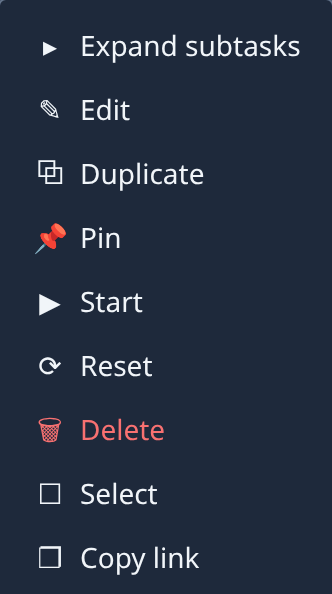
Select ▸ before the title. The subtasks appear under the row, set in, and the mark turns to ▾. You can also open the row's ⋯ menu and select Expand subtasks, its first item.
-
Read each subtask's row like any other: its state icon, title, persona (such as Analyze, Design, Plan, Coder or Finish), tokens, cost, people and age. The epic's own Tokens and Cost count all of its subtasks together.

-
Select a subtask's title to open its page beside the board. Act on it there, or from its own ⋯ menu.
-
To fold the subtasks away, select ▾ before the epic's title, or Collapse subtasks in its ⋯ menu.
To see the subtasks grouped by stage instead, open the epic and select its Subtasks tab: it lists them under Prepare, each build phase and Finish. Subtasks can't be pinned or ticked for a bulk action.
Related
- How epics and features work: what an epic is and how it splits into subtasks.
- Steer an epic's subtasks: start, stop or change one subtask.
- See what an epic cost: find which stage cost the most.